How To Configure Client Configuration Automatic Broadcast to Support Limited Broadcast
Introduction
This documentation provides guidance on setting up automated limited broadcast, which is triggered during the startup of a POS. For the Standard Enactor POS, this can be done via a Diary Job, while for the RDF Enactor POS, it can be sent either as an automatic broadcast or via a Diary Job.
Overview
This guide will cover the configuration for the following:
- Set up Predefined Broadcast Configuration
- Register and configure Process Details
- Define Client Device Configuration options
- Assign Broadcast Download Proxy URL and Limited Broadcast Extension ID
- Regenerate device serial number and initialize Reduced POS
Prior Training/Experience
You should be familiar with the following:
- Estate Manager Configuration
- Data Broadcasting
Configuration Steps
Prerequisites
Estate manager should have External File - File Repository enabled.
Predefined Broadcast Configuration
To create a new Predefined Broadcast, follow the steps below:
The Predefined Broadcast Maintenance application can be accessed through:
Administration > Data Management > Broadcasts > Predefined Broadcast

To create a new Predefined Broadcast, select Create a new Predefined Broadcast on the Predefined Broadcast Maintenance page.
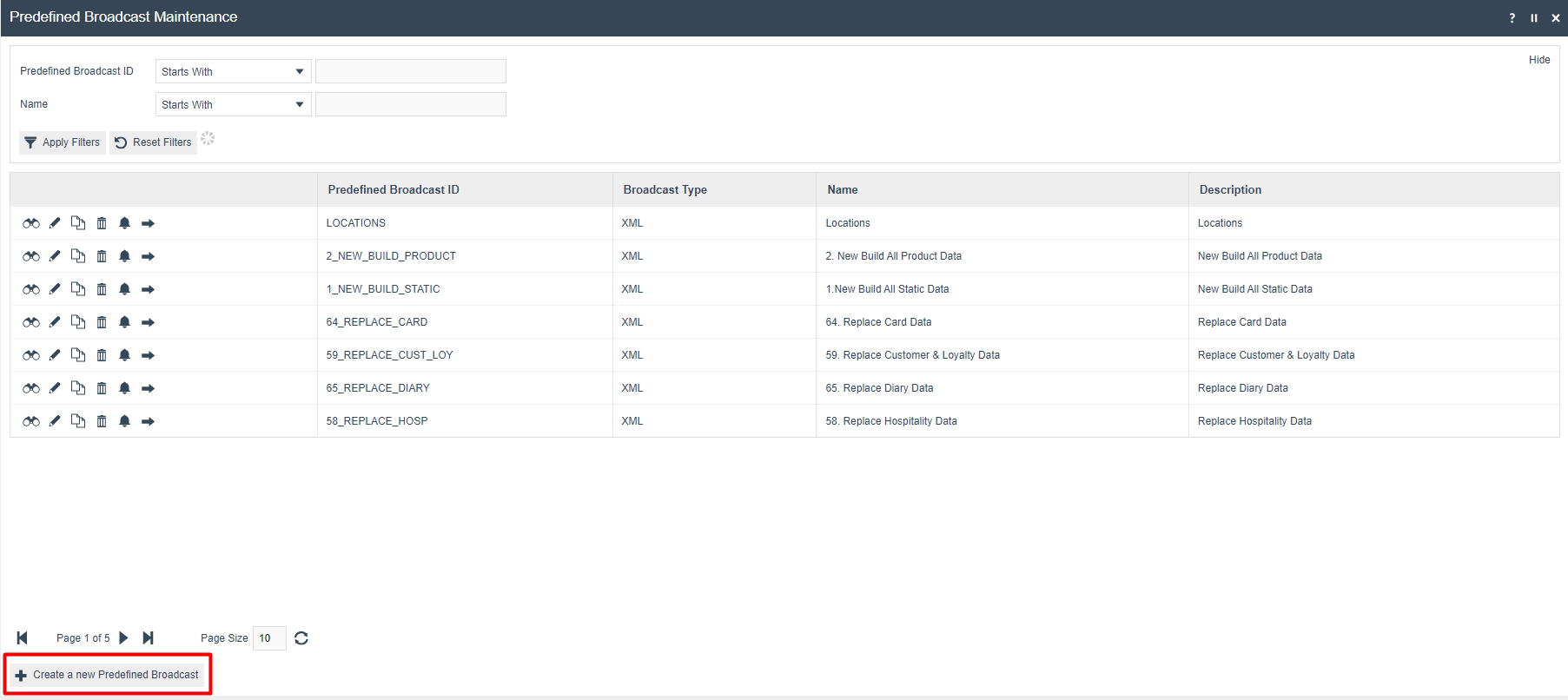
Uncheck 'Select Target on Broadcast' if it is already checked. Then, set 'Send To' as 'Device' and select the device to which the data should be broadcasted.
Navigate to the Source directory and set source directory to the broadcast as given below:
/enactor/app/home/Downloads/{any_preferred_name}/
Eg: /enactor/app/home/Downloads/targetbroadcast/
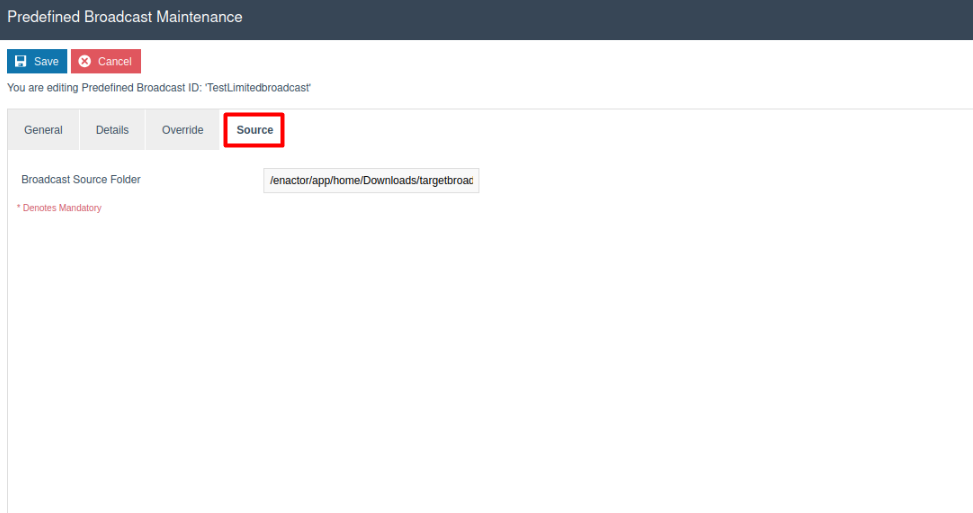
Ensure that the Broadcast Source folder path in the predefined Broadcast ends with a "/".
Process Details Configuration
Three new process details should be registered to EM.
Processes should be registered with following Extension Point IDs:
| Process Id | Extension Point Id should be added |
|---|---|
| EstateDirector/FilteredDataBroadcast/FilteredDataBroadcastProcessor | LimitedBroadcastExtension |
| EstateDirector/FilteredDataBroadcast/ExportAndBroadcastFilteredData | ExportAndBroadcastFilteredData |
| EstateDirector/FilteredDataBroadcast/TargetBroadcastDataBroadcastProcessor | TargetBroadcastDataBroadcastProcessor |
If File import is used to import the process details, Estate manager should be restarted in order to restart its services.
Go to Process Details Maintenance and edit the LimitedBroadcastExtension Process Detail.
Navigate to Data section and data should be defined according to following table.
| Name | Type | Description | Optional/Mandatory |
|---|---|---|---|
| MMGGroupKey | String | MMGGroupKey. Multiple comma-separated IDs are valid. Also supports subgroup Keys. | At least MMGGroupKey, ProductGroupKey, ListID, or EntityList must be provided. |
| ProductGroupKey | String | ProductGroupKey. Multiple comma-separated IDs are valid. Also supports subgroup Keys. | At least MMGGroupKey, ProductGroupKey, ListID, or EntityList must be provided. |
| ListID | String | Product List ID. Multiple comma-separated IDs are valid. | Optional |
| MaxRecordCount | Integer | Number of maximum records per file. | Optional |
| PredefinedBroadcastID | String | Unique ID to identify the broadcast configuration. Note: Make sure to add the new PredefinedBroadcastID that was created in the previous section. | Mandatory |
| EntityList | String | Set of entities. | Optional |
When broadcasting MMGGroupKey/ProductGroupKey/ListID related set of products, it will export and send following set of entities in the zip file:
- product
- productPrice (if exists with products)
- sellingcode (if exists with products)
- productMedia (if exists with products)
Format for MMGGroupKey, ProductGroupKey, ListID and entityList are given below.
| Name | Format | Example |
|---|---|---|
| MMGGroupKey | MMgroup_ID_1;MM_Group_Hierachy_ID_1, MMgroup_ID_2;MM_Group_Hierachy_ID_2,... MMgroup_ID_n;MM_Group_Hierachy_ID_n | ACCSS_CHILD_BELT;ALL,ACCSS_MEN_BELT;ALL DRONES;RETAIL,BOYS_TROUSERS;RETAIL,MENS_BAGS;RETAIL |
| ProductGroupKey | Productgroup_ID_1;Product_Group_Hierachy_ID_1, Productgroup_ID_2;Product_Group_Hierachy_ID_2,... Productgroup_ID_n;Product_Group_Hierachy_ID_n | PERCENT_DISCOUNT_20;PROMOTION,fb_rolls;food WC_DRESSES;FASHION,MA_BAGS;FASHION |
| ListID | productList1,ProductList2...ProductList_n | TestProductList1,TestProductList2,TestProductList3 |
| EntityList | Entity1,Entity2,...Entity_n | currency,group,menu,menuSet,role,userTemplate,user,taxScheme,tender |
-
If you need to broadcast MMGGroupKey list - PredefinedBroadcastID should be defined (Mandatory). Entity List can be defined if you want to broadcast entity details.
-
If you need to broadcast ProductGroupKey list - PredefinedBroadcastID should be defined (Mandatory). Entity List can be defined if you want to broadcast entity details.
-
If you need to broadcast ListID list - PredefinedBroadcastID should be defined (Mandatory). Entity List can be defined if you want to broadcast entity details.
-
If you need to broadcast EntityList - PredefinedBroadcastID should be defined (Mandatory). You can pass the EntityList by defining it in the Data section of the LimitedBroadcastExtension process detail, or by adding entities to the Entity Details section in the predefined broadcast.
Make sure to pass the entity names (EntityList) in camelCase format when providing the EntityList via the Data section of the LimitedBroadcastExtension process detail.
For Example: menuSet, userTemplate, taxScheme.
-
If you input MMGGroupKey and ListID - Only products related to the specified MMGGroupKey list will be broadcast.
-
If you input MMGGroupKey and ProductGroupKey - Only products related to the specified MMGGroupKey list will be broadcast.
-
If you input ProductGroupKey and ListID - Only products related to the specified ProductGroupKey list will be broadcast.
-
If you input ListID and EntityList - Broadcasts products related to the specified ProductList and additionally broadcasts entities related to the given EntityList.
-
If you input MMGGroupKey and EntityList - Broadcasts products related to the specified MMGGroupKey list and entities related to the given EntityList.
-
If you input ProductGroupKey and EntityList - Broadcasts products related to the specified ProductGroupKey list and entities related to the given EntityList.
Client Device Configuration
Navigate to the relevant option set that is being used as the client configuration set for your device.
Define a new text option as follows:
ID: Limited.Broadcast.Extension.Id
Value: Limited Broadcast Extension Id.
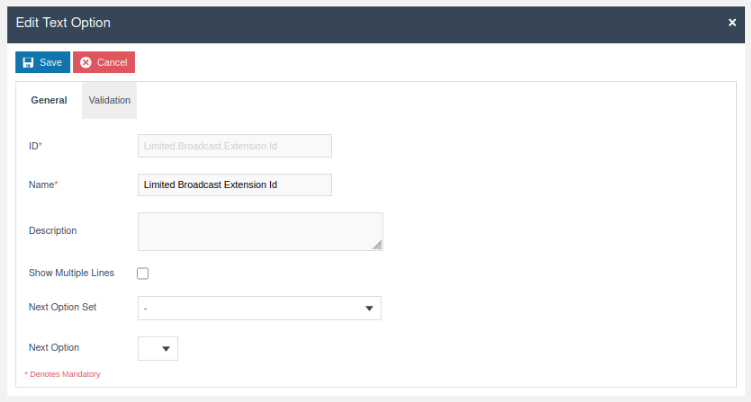
With the above configuration, the automatic broadcast will be overridden by the automated limited broadcast.
Next, the Limited Broadcast Extension Id and the Broadcast Download ProxyUrl should be defined for client device. For this, navigate to the relevant client configuration set that you are using for your device and configure the appropriate Broadcast Download ProxyUrl based on the validation environment being used and enter the Limited Broadcast Extension Id as follows:
Example Broadcast Download ProxyUrl:
http://192.168.10.34/WebCore/BroadcastFileDownloadServlet

Finally, go to your device, regenerate a new serial number, and start a new Reduced POS using the generated serial number.
Diary Entry Configuration
To configure Limited Broadcasts for the Standard Enactor POS, a Diary Job needs to be configured. This is a manual broadcast trigger using a Diary entry job, so as the prerequisites, below configurations should be added accordingly.
Log in to the Estate Manager and click on Calendar icon in the top right corner to load the Diary Maintenance.
Click Create a new System Job.
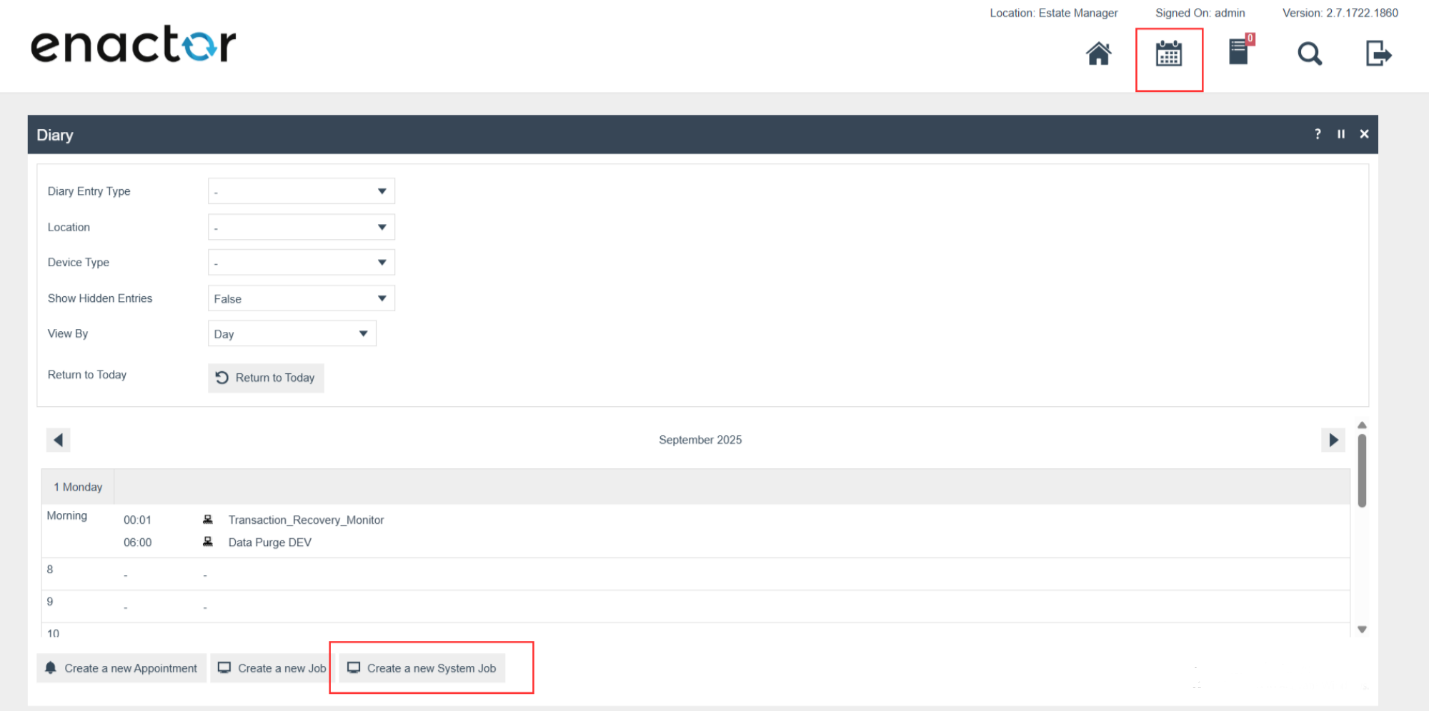
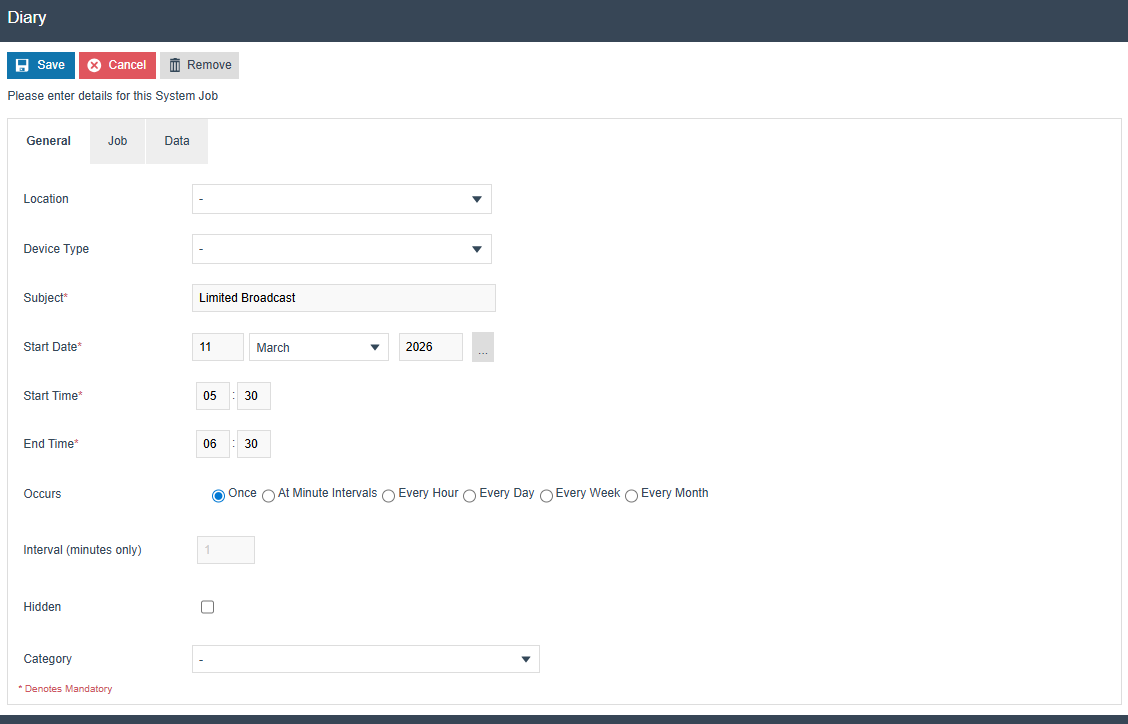
Then click on Create and go to the General Tab of Diary Configuration.
Fill out the mandatory fields like Subject, Start Date, Start Time and End Time etc. Make sure to keep minimum 1 hour in between Start time and End Time to avoid any failures due to execution/network delays.
Update the occurrences rate that you need to occur.
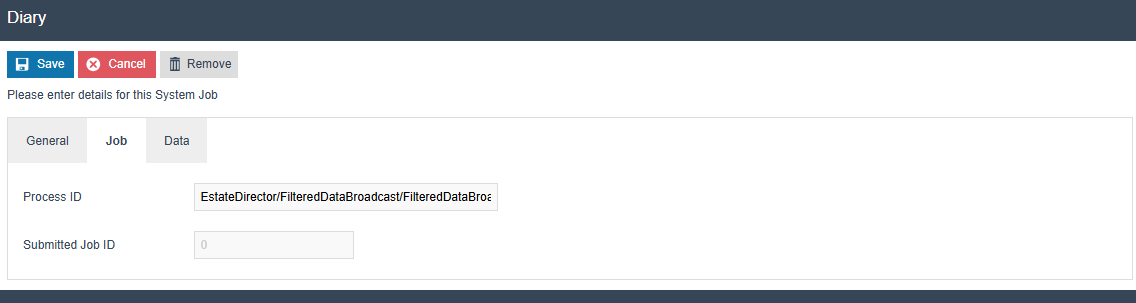
Navigate to the Job tab and add the Process ID as EstateDirector/FilteredDataBroadcast/FilteredDataBroadcastProcessor
Note: This is case-sensitive.
Navigate to 'Data' tab and add following parameters.
| Name | Type | Description | Optional/Mandatory |
|---|---|---|---|
| MMGGroupKey | String | MMGGroupKey. Multiple comma separated IDs are valid. Also, this should support for subgroups Keys | At least MMGGroupKey, ProductGroupKey, ListID or EntityList should be available |
| ProductGroupKey | String | ProductGroupKey. Multiple comma separated IDs are valid. Also this should support for subgroups Keys | At least MMGGroupKey, ProductGroupKey, ListID or EntityList should be available |
| ListID | String | Product List ID. Multiple comma separated IDs are valid | Optional |
| MaxRecordCount | Integer | Number of maximum records per file | Optional |
| PredefinedBroadcastID | String | Unique id to identify the broadcast configuration | Mandatory |
| EntityList | String | Set of entities | Optional |
When broadcasting MMGGroupKey/ProductGroupKey/ListID related set of products, it will export and send following set of entities in the zip file:
- product
- productPrice (if exists with the products)
- sellingcode (if exists with the products)
- productMedia (if exists with the products)
Format for MMGGroupKey, ProductGroupKey, ListID and entityList are given below.
| Name | Format | Example |
|---|---|---|
| MMGGroupKey | MMgroup_ID_1;MM_Group_Hierachy_ID_1, MMgroup_ID_2;MM_Group_Hierachy_ID_2,... MMgroup_ID_n;MM_Group_Hierachy_ID_n | ACCSS_CHILD_BELT;ALL,ACCSS_MEN_BELT;ALL DRONES;RETAIL,BOYS_TROUSERS;RETAIL,MENS_BAGS;RETAIL |
| ProductGroupKey | Productgroup_ID_1;Product_Group_Hierachy_ID_1, Productgroup_ID_2;Product_Group_Hierachy_ID_2,... Productgroup_ID_n;Product_Group_Hierachy_ID_n | PERCENT_DISCOUNT_20;PROMOTION,fb_rolls;food WC_DRESSES;FASHION,MA_BAGS;FASHION |
| ListID | productList1,ProductList2...ProductList_n | TestProductList1,TestProductList2,TestProductList3 |
| EntityList | Entity1,Entity2,...Entity_n | currency,group,menu,menuSet,role,userTemplate,user,taxScheme,tender |
-
If you need to broadcast MMGGroupKey list - PredefinedBroadcastID should be defined (Mandatory). Entity List can be defined if you want to broadcast entity details.
-
If you need to broadcast ProductGroupKey list - PredefinedBroadcastID should be defined (Mandatory). Entity List can be defined if you want to broadcast entity details.
-
If you need to broadcast ListID list - PredefinedBroadcastID should be defined (Mandatory). Entity List can be defined if you want to broadcast entity details.
-
If you need to broadcast EntityList - PredefinedBroadcastID should be defined (Mandatory).
-
You can pass the EntityList by defining it in the Data section of the Diary entry job.
Note: Make sure to pass the entity names (EntityList) in camelCase format when providing the EntityList via the Data section of the Diary Entry Job.
For Example: currency,group,menu,menuSet,role,userTemplate,user,taxScheme,tender
-
If you input MMGGroupKey and ListID - Only products related to the specified MMGGroupKey list will be broadcast.
-
If you input MMGGroupKey and ProductGroupKey - Only products related to the specified MMGGroupKey list will be broadcast.
-
If you input ProductGroupKey and ListID - Only products related to the specified ProductGroupKey list will be broadcast.
-
If you input ListID and EntityList - Broadcasts products related to the specified ProductList and additionally broadcasts entities related to the given EntityList.
-
If you input MMGGroupKey and EntityList - Broadcasts products related to the specified MMGGroupKey list and entities related to the given EntityList.
-
If you input ProductGroupKey and EntityList - Broadcasts products related to the specified ProductGroupKey list and entities related to the given EntityList.
Click Save, and the broadcast will now trigger during the above-configured time in the diary entry job and will broadcasting will take place accordingly.