How-to Guide - Configuring Web Reports
Introduction
In the Enactor Retail System, Web Reports provide operational visibility across stores, covering areas such as cash management, sales, inventory, employee activity, and promotions. Reports are accessed through the Estate Manager and Back Office applications and are organised into categories such as Cash Management, Sales Summary, Product, Tender, and more.
With the Q1 2026 release, Enactor introduced Enhanced Web Reports (V2) that deliver significantly improved report generation times and better maintainability. Some enhanced reports replace existing menu items automatically, while others require new menu items to be added via Menu Maintenance.
The purpose of this guide is to demonstrate the steps required to configure both basic and enhanced web reports in the Enactor Estate Manager and Back Office menus.
Overview
The following steps are required to enable Web Reports:
- Basic Web Reports Configuration - Add standard web report menu items to the Estate Manager or Back Office menus
- Enhanced Web Reports Configuration - Add new V2 enhanced report menu items where required, using updated IDs and ReportDefinitionId values
- Broadcasting - Deliver the updated menu configuration to the relevant devices
Prerequisites
Before starting, you should have the following resources in place:
- Enactor Estate Manager
- Menu Maintenance access permissions
You should be familiar with the following:
- Estate Manager navigation
- Menu configuration
- Data broadcasting
The enhanced V2 reports will only contain data generated since the Q1 2026 release deployment. Data from before the deployment will not be used to generate the improved reports. The old reports can still be used side-by-side with the improved reports.
Configuration Steps - Basic Web Reports Configuration
This section covers the steps to add standard web report menu items to your Estate Manager or Back Office menus.
The following web report categories are available in Enactor:
| Report Category | Reports |
|---|---|
| Cash Management | Banking Transactions, Cash On Hand, Cash Up Summary, Income Expense Transactions, Outlay Transactions, Overview, Safe Discrepancies, Tender Bag Collections, Terminal Discrepancies |
| Customer Order Reports | Customer Order Totals Report |
| Employee | Employee Balance, Employee Sales |
| Exception | Activity Statistics, Reason Code by Weekday, Terminal Exceptions, Transactions Void, User Exception Analysis |
| Fiscalisation | SAF-T File Generator |
| ICC Readers | Duplicated ICC Readers, ICC Reader Connections, Unexpected ICC Readers |
| Inventory Management | Location Transfers Report, Receipt Discrepancy Report, Stock Adjustment Print, Stock Levels, Stock Take Summaries |
| Product | Best/Worst Sellers by Units, Best/Worst Sellers by Value, Best/Worst Selling Styles by Units, Best/Worst Selling Styles by Value, MMG Summary, MMG Summary Pie Chart, Price Changes, Product Sales, Replenishment, Returns, Rolling Replenishment, Rolling Replenishment Stock Ledger Transactions, Sales Tax, Sales Transactions, Stock Valuation, Trading Summary |
| Promotion Reports | Promotion Summary |
| Sales Summary | Average Transaction, Daily Sales Summary, Financial Performance, Gift Card Product and Tender Summary, Sales Analysis by Hour, Stock Ledger Sales, Store Performance, Tax Exemptions, Transaction Totals, User Sales |
| Time and Attendance | Time and Attendance Report Items |
| Tender | Card Transactions, Credit Note Outstanding Balances, Gift Card Outstanding Balances, Manufacturer Coupon Transactions, Tender Totals, Tender Totals Pie Chart, Terminal X Report |
| Voucher | Voucher Outstanding Balances |
Accessing Menu Maintenance
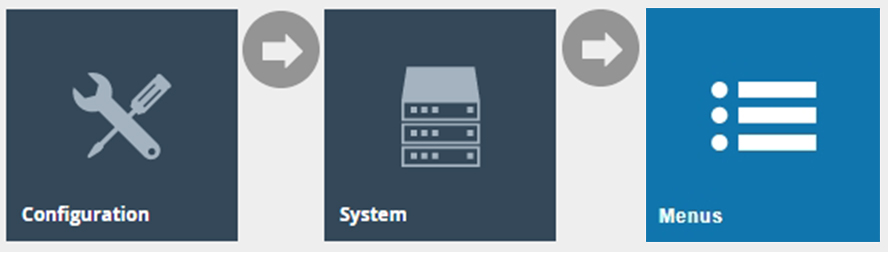
Navigate to Menu Maintenance using the Search or the path:
Configuration > System > Menus
The Menu Maintenance list is displayed, showing all configured menus:
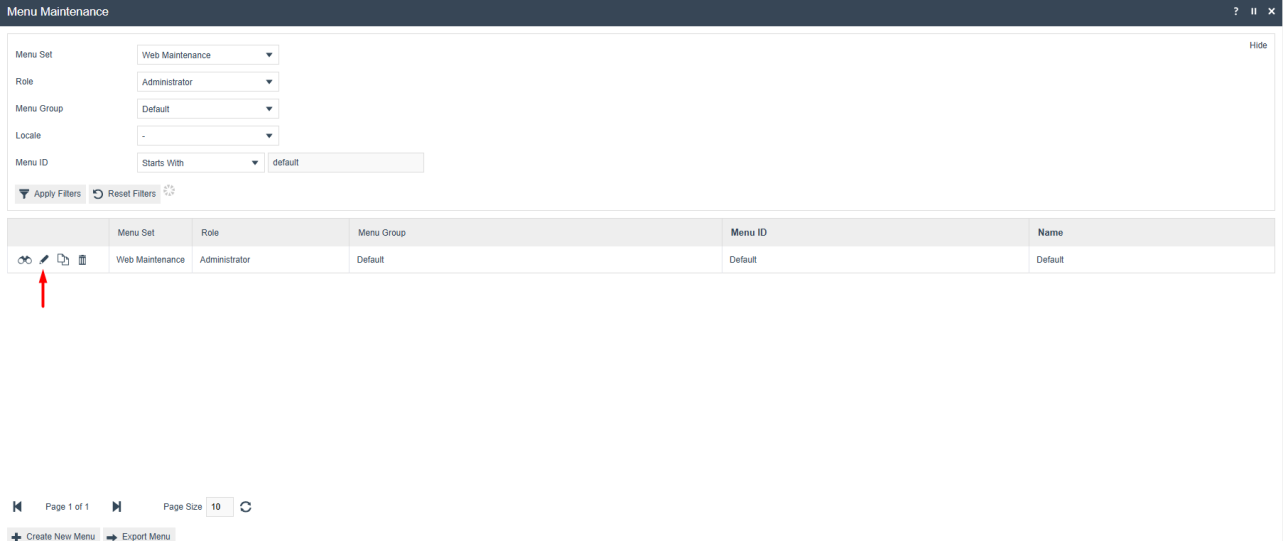
| Field | Description |
|---|---|
| Menu Set | The application set the menu belongs to, e.g. Web Maintenance for Estate Manager or Back Office. |
| Role | The user role this menu applies to. |
| Menu Group | The menu group within the set. |
| Menu ID | The unique identifier for the menu. |
| Name | The display name of the menu. |
Adding a Report Menu Item
The following example demonstrates adding the Product Sales report. The same steps apply to any web report.
Phase 1 - Navigating to the Report Folder
-
Open the Menu: Access and edit the specific Estate Manager or Back Office menu where the report will be added.
-
Locate the Folder: Navigate to the Report Menu Folder.
-
Expand Reports: In the menu list, locate the Reports section and click the "+" icon to expand the folder.
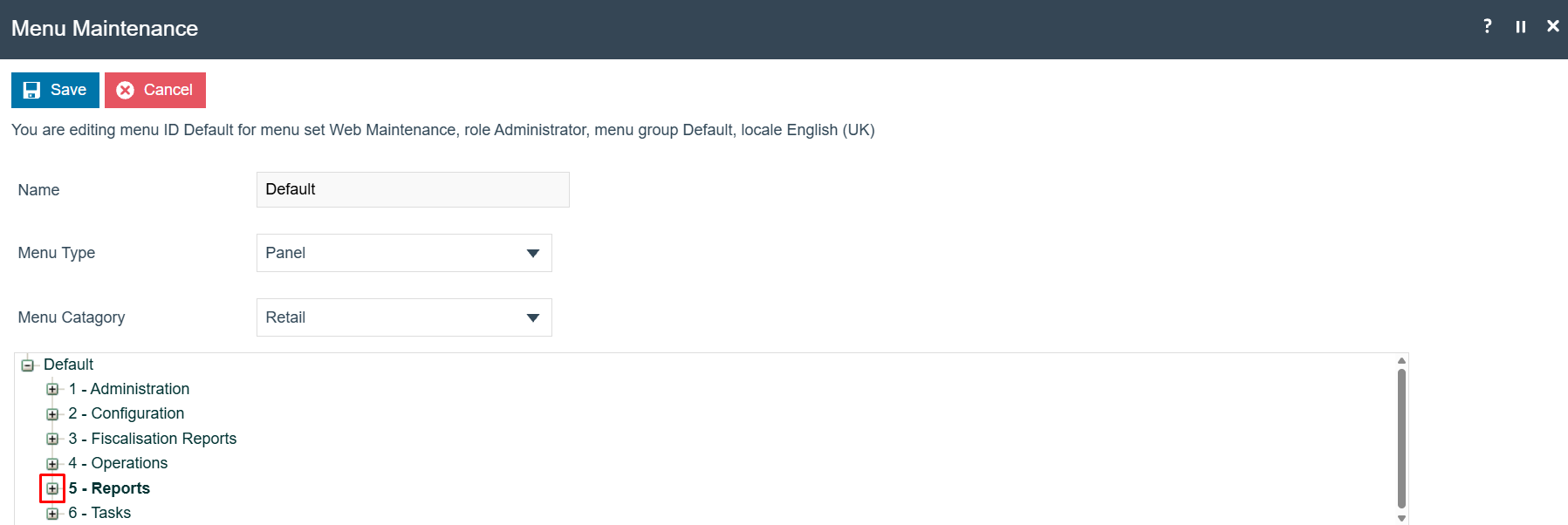
-
Select Category: Navigate to the Product Reports sub-folder (or the specific category required) and select it.
-
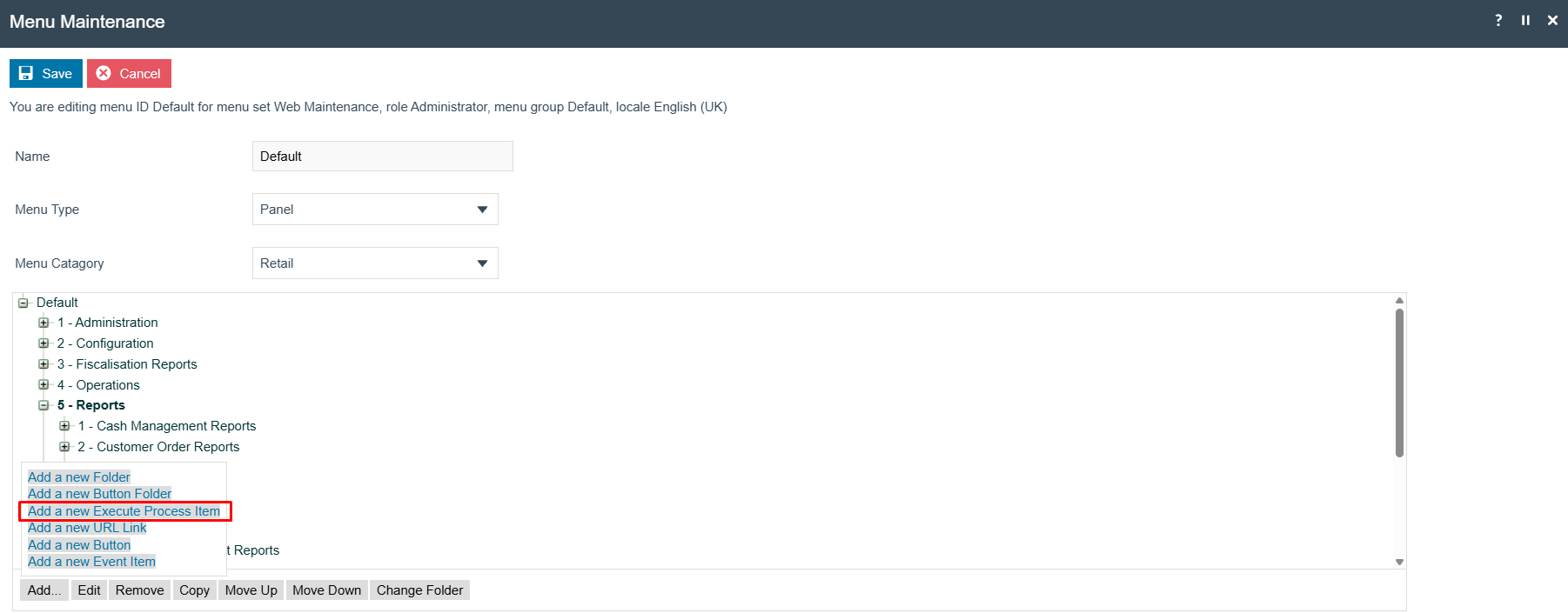
Initialize New Item: Click the Add button at the bottom of the Menu Maintenance screen.
-
Confirm Item Type: Select Add a new Execute Process Item to confirm the creation of the new entry.
Phase 2 - Configuring the General Tab
Navigate to the General tab and populate the fields using the following configuration:
| Field | Value / Description |
|---|---|
| Application Process to Run | Maintenance Run Report |
| ID | Refer to the Report ID Reference below for the appropriate Report Definition ID. (e.g. Product/ProductSalesV2) |
| Item Label | The display name for the report (e.g. Product Sales) |
| Item Message ID | The message key (e.g. PRODUCT_SALES) |
| Item Message Base | Maintenance/DefaultMenu/RetailProcessingMenuMessages |
| Image URL | The icon filename for the menu tile (e.g. productsales.svg) |
Report ID Reference
Use the following table to identify the correct Report ID when configuring the ID field on the General tab:
View all Report IDs
| Report ID | Report Name |
|---|---|
Exception/ActivityStatistics | Activity Statistics Report |
SalesSummary/AverageTransaction | Average Transaction Report |
CashManagement/BankingTransactions | Banking Transactions Report |
Product/BestWorstSellersByUnits | Best / Worst Sellers Report By Units |
Product/BestWorstSellersByValue | Best / Worst Sellers Report By Value |
Product/BestWorstSellingStylesByUnits | Best / Worst Selling Styles By Units |
Product/BestWorstSellingStylesByValue | Best / Worst Selling Styles By Value |
Tender/CardNumberTemplate | Card Number Template (Test) Report |
PaymentPortal/CardRegistrationSummaryReport | Card Registration Summary Report |
Tender/CardTransactions | Card Transactions Report |
CashManagement/CashOnHand | Cash On Hand Report |
CashManagement/CashOnHandV2 | Cash On Hand Report (Revised) |
CashManagement/CashUpSummary | Cash Up Summary Report |
CashManagement/CashUpSummaryV2 | Cash Up Summary Report (Revised) |
Tender/CreditNoteOutstandingBalances | Credit Note Outstanding Balances Report |
CustomerOrder/CustomerOrderItemTotals | Customer Order Item Totals Report |
CustomerOrder/CustomerOrderTotals | Customer Order Totals Report |
SalesSummary/DailySalesSummary | Daily Sales Summary Report |
InventoryManagement/DispatchNotePrint | Dispatch Note Print Report |
InventoryManagement/DistributionOrderPrint | Distribution Order Print Report |
ICCReader/DuplicatedICCReaders | Duplicated ICC Readers Report |
Employee/EmployeeBalance | Employee Balance Report |
Employee/EmployeeSales | Employee Sales Report |
Users/ExpiredUsersByAssociatedLocations | Expired Users By Associated Locations |
SalesSummary/FinancialPerformance | Financial Performance Report |
SalesSummary/FinancialPerformance2 | Financial Performance Report (Revised) |
Tender/GiftCardOutstandingBalances | Gift Card Outstanding Balances Report |
SalesSummary/GiftCardTenderAndProductSales | Gift Card Product and Tender Summary |
CashManagement/GuidedDayEndOverview | Guided Day End Overview Report |
ICCReader/ICCReaderConnections | ICC Reader Connections Report |
CashManagement/IncomeExpenseTransactions | Income Expense Transactions Report |
CashManagement/IncomeExpenseTransactionsWithNotes | Income Expense Transactions With Notes |
InventoryManagement/WMS/InventoryPickListPrint | Inventory Pick List Print Report |
InventoryManagement/InventoryReceiptPrint | Inventory Receipt Print Report |
InventoryManagement/LocationTransfers | Location Transfers Report |
Tender/ManufacturerCouponTransactions | Manufacturer Coupon Transactions Report |
Product/MMGSummaryPieChart | MMG Summary Pie Chart |
Product/MMGSummaryPieChartV2 | MMG Summary Pie Chart (Revised) |
Product/MMGSummary | MMG Summary Report |
Product/MMGSummaryV2 | MMG Summary Report (Revised) |
CashManagement/OutlayByTransaction | Outlay By Transaction |
CashManagement/OutlayReturnByTransaction | Outlay Return By Transaction |
CashManagement/OutlayTransactions | Outlay Transactions |
CashManagement/Overview | Overview Report |
PaymentPortal/PaymentTransactionSummaryReport | Payment Transactions Summary Report |
Product/PriceChanges | Price Changes Report |
LabelPrinting/ProductLabellingPrintSheet | Product Labelling Print Sheet |
Product/ProductSales | Product Sales Report |
Product/ProductSalesV2 | Product Sales Report (Revised) |
Promotion/PromotionSummary | Promotion Summary Report |
InventoryManagement/PurchaseOrderPrint | Purchase Order Print Report |
Exception/ReasonCodeByWeekday | Reason Code by Weekday Report |
Exception/ReasonCodeByWeekdayV2 | Reason Code by Weekday Report (Revised) |
InventoryManagement/ReceiptDiscrepancyReport | Receipt Discrepancy Report |
Product/Replenishment | Replenishment Report |
Product/ReplenishmentV2 | Replenishment Report (Revised) |
Product/Returns | Returns Report |
Product/RollingReplenishmentStockLedger | Rolling Replen. Stock Ledger Report |
Product/RollingReplenishment | Rolling Replenishment Report |
Product/RollingReplenishmentV2 | Rolling Replenishment Report (Revised) |
CashManagement/SafeDiscrepancies | Safe Discrepancies Report |
SalesSummary/SalesAnalysisByHour | Sales Analysis by Hour Report |
Product/SalesTax | Sales Tax Report |
Product/SalesTransactions | Sales Transactions Report |
PaymentPortal/SettlementStatusSummaryReport | Settlements Status Summary Report |
InventoryManagement/StockAdjustmentPrint | Stock Adjustment Print Report |
SalesSummary/StockLedgerSales | Stock Ledger Sales Report |
Product/StockLevels | Stock Levels |
InventoryManagement/StockTakeSummariesReport | Stock Take Summaries Report |
InventoryManagement/StockTakeSummaryPrint | Stock Take Summary Report |
Product/StockValuation | Stock Valuation |
SalesSummary/StorePerformance | Store Performance Report |
SalesSummary/StorePerformance2 | Store Performance Report (Revised) |
InventoryManagement/SupplierReturnPrint | Supplier Return Print Report |
TAActivity/TAActivityReportItems | TaActivity Report Items |
SalesSummary/TaxExemptions | Tax Exemptions Report |
CashManagement/TenderBagCollection | Tender Bag Collection |
CashManagement/TenderBagCollectionByTransaction | Tender Bag Collection By Transaction |
CashManagement/TenderBagCollectionWithoutValue | Tender Bag Collection Without Values |
Tender/TenderTotalsPieChart | Tender Totals Pie Chart Report |
Tender/TenderTotalsPieChartV2 | Tender Totals Pie Chart Report (Revised) |
Tender/TenderTotals | Tender Totals Report |
CashManagement/TerminalDiscrepancies | Terminal Discrepancies Report |
Exception/TerminalExceptions | Terminal Exceptions Report |
CashManagement/TerminalFloatRequest | Terminal Float Request Report |
Tender/TerminalX | Terminal X Read Report |
Tender/TerminalXV2 | Terminal X Read Report (Revised) |
Product/TradingSummary | Trading Summary Report |
Product/TradingSummaryV2 | Trading Summary Report (Revised) |
SalesSummary/TransactionTotals | Transaction Totals Report |
SalesSummary/TransactionTotalsV2 | Transaction Totals Report (Revised) |
Exception/TransactionVoids | Transaction Voids Report |
ICCReader/UnexpectedICCReaders | Unexpected ICC Readers Report |
Exception/UserExceptionAnalysis | User Exception Analysis Report |
SalesSummary/UserSales | User Sales Report |
SalesSummary/UserSalesV2 | User Sales Report (Revised) |
Voucher/VoucherOutstandingBalances | Voucher Outstanding Balances Report |
A full list of report definitions can also be found in Report Definition Maintenance in the Estate Manager. Filter by Report ID to locate the definition you need.
Phase 3 - Configuring the Data Tab
-
Configure Data Tab: Navigate to the Data tab to link the menu item to the specific report definition.
-
Set Definition ID: Locate the field
enactor.coreReporting.ReportDefinitionId. In the Value column, enter the correct Report Definition ID (e.g.Product/ProductSalesV2).
This ensures the menu item executes the correct report logic when selected by the user.
-
Commit Changes: Click Save to finalise the menu item configuration, then click Save again on the main screen to update the entire menu structure.
-
Refresh Session: Sign out and sign back into the application for the changes to take effect.
This completes the Basic Web Reports configuration.
Configuration Steps - Enhanced Web Reports Configuration
This section covers the enhanced web reports introduced with the Q1 2026 release. These reports provide significantly reduced report generation times and improved maintainability.
The following table lists all enhanced reports and indicates which require new menu items to be configured:
| Report | Requires Menu Configuration? |
|---|---|
| Banking Transactions | No |
| Cash On Hand | Yes |
| Cash Up Summary | Yes |
| Daily Sales Summary | No |
| MMG Summary | Yes |
| MMG Summary Pie Chart | Yes |
| Product Sales | Yes |
| Promotion Summary | No |
| Reason Code By Weekday | Yes |
| Replenishment | Yes |
| Rolling Replenishment | Yes |
| Sales Analysis By Hour | No |
| Tender Totals | No |
| Tender Totals Pie Chart | Yes |
| Terminal Discrepancies | No |
| Terminal Exceptions | No |
| Terminal X | Yes |
| Trading Summary | Yes |
| Transaction Totals | Yes |
| Transaction Voids | No |
| User Exception Analysis | No |
| User Sales | Yes |
Reports marked No will use the existing menu events and do not require any changes. Reports marked Yes must be added as new menu items following the steps below.
Adding Enhanced Report Menu Items
To add the enhanced reports that require menu configuration, navigate to Menu Maintenance in the Estate Manager.
Configuration > System > Menus
Follow the same steps as the Basic Web Reports Configuration above:
- Edit the Estate Manager or Back Office menu.
- Edit the report menu item and on the General tab, add V2 to the end of the ID field.
- On the Data tab, set the
enactor.coreReporting.ReportDefinitionIdvalue to the correct V2 Report Definition ID.
A full list of enhanced Report Definition IDs can be found in Report Definition Maintenance. Filter by Report ID containing v2 to see all available enhanced definitions:
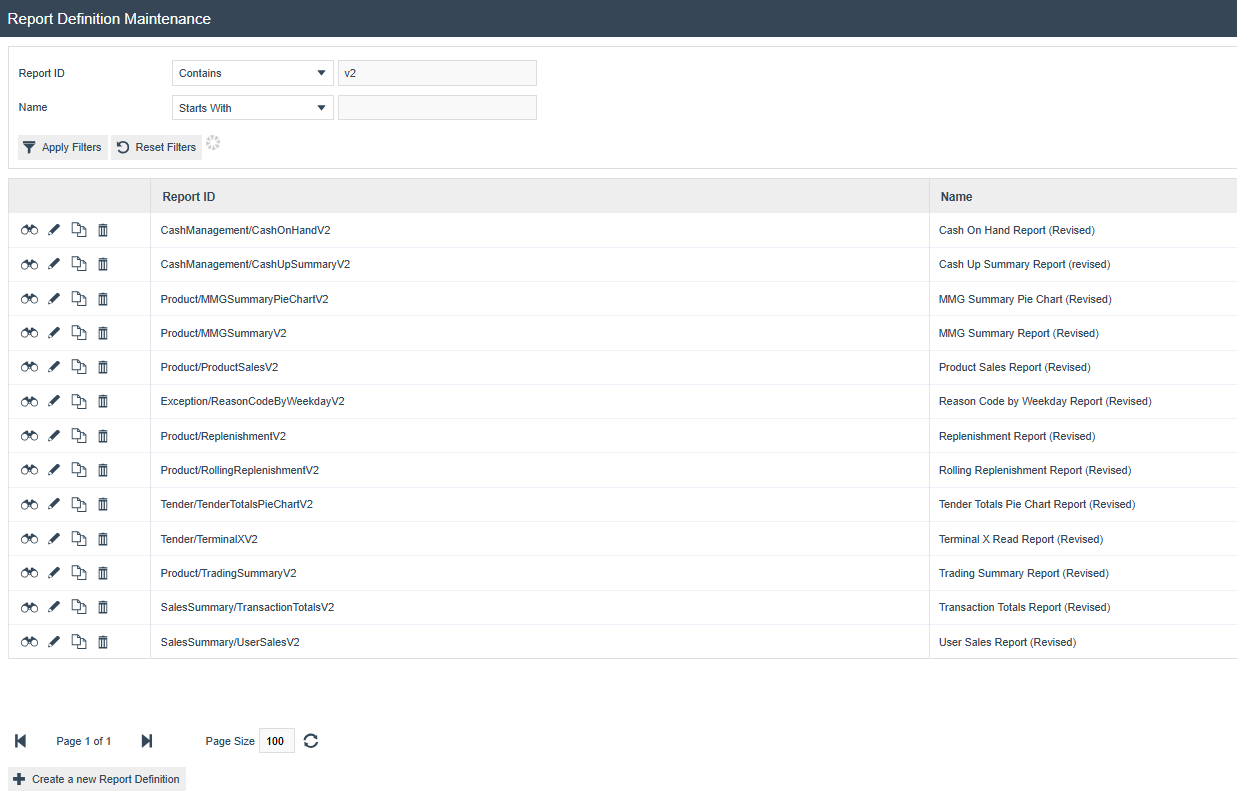
ReportDefinitionId on the menu item Data tab.
| Field | Description |
|---|---|
| Report ID | The unique identifier for the report definition. Use this value as the ReportDefinitionId on the menu item Data tab. |
| Name | The display name of the report definition. |
Enhanced Report Definition Reference
The following table provides the Report Definition IDs for all enhanced reports that require menu configuration:
| Report | Report Definition ID |
|---|---|
| Cash On Hand | CashManagement/CashOnHandV2 |
| Cash Up Summary | CashManagement/CashUpSummaryV2 |
| MMG Summary | Product/MMGSummaryV2 |
| MMG Summary Pie Chart | Product/MMGSummaryPieChartV2 |
| Product Sales | Product/ProductSalesV2 |
| Reason Code By Weekday | Exception/ReasonCodeByWeekdayV2 |
| Replenishment | Product/ReplenishmentV2 |
| Rolling Replenishment | Product/RollingReplenishmentV2 |
| Tender Totals Pie Chart | Tender/TenderTotalsPieChartV2 |
| Terminal X | Tender/TerminalXV2 |
| Trading Summary | Product/TradingSummaryV2 |
| Transaction Totals | SalesSummary/TransactionTotalsV2 |
| User Sales | SalesSummary/UserSalesV2 |
Click Save to complete adding each enhanced report menu item, then click Save again to save the menu. Sign out and sign back in for the changes to take effect.
This completes the Enhanced Web Reports configuration.
Configuration Steps - Broadcasting
To deliver the updated menu configuration to the Back Office devices, broadcast the following entity:
- Menus
Menu changes must be broadcast to the Back Office devices that use the updated menus. Users must sign out and sign back in after the broadcast for the changes to take effect on their session.
This completes the Broadcasting configuration.
About This Document
(c) 2026 Enactor Ltd
All documents produced by Enactor Ltd are supplied to customers subject to Copyright, commercial confidentiality, and contractual agreements and must not be copied or transferred without permission.
Document Context
This document is part of the Enactor Product Documentation Series. All Enactor products include a comprehensive documentation set designed to improve understanding of the product and facilitate ease of use.
Document Inquiries
If you find that a document is inaccurate or deficient in any way, please contact:
Email: documentation@enactor.co.uk
Document History
| Version | Status | Issue Date | Author | Reason for Issue | Software Version |
|---|---|---|---|---|---|
| 1.0 | Initial Draft | 30 March 2026 | Hadhi Jawahir | Initial Version | 2.7.1784.35 |
| 1.1 | Document Update | 27 April 2026 | Shenol Silva | Added report menu item configuration and report definitions reference | 2.7.1795.1940 |