How-to Guide - Rest API - RFID Security
Introduction
Serial numbers should be configured through Serial Number Maintenance and Product Maintenance. This covered in the "How To Guide - Keonn RFID Reader" document.
The online serial update feature can be enabled or disabled in POS Terminal or POS Terminal Template maintenance.
If enabled, the POS will make a real-time API call to the Serial Number Status Service. This will be a single POST request, with the request body containing an array of all the serial numbers sold or returned in the transaction.
The Serial Number Update call is made from the POS on a background thread. If the service does not respond within a timeout period (e.g., 5 seconds), the user will be prompted with a Cancel button, allowing them to either wait for the full timeout or cancel the request. If the API call times-out or the user cancels it, the event will be logged, and the POS will proceed to complete the transaction.
If the request fails for any reason, the failure is logged, and the POS continues to complete the transaction.
SCO will fail silently.
Functionality Supported
Serial number updates are supported in the following scenarios:
-
Take Now and Returns.
-
Post-Transaction Void.
-
Order Returns.
Configurations
Inventory Types
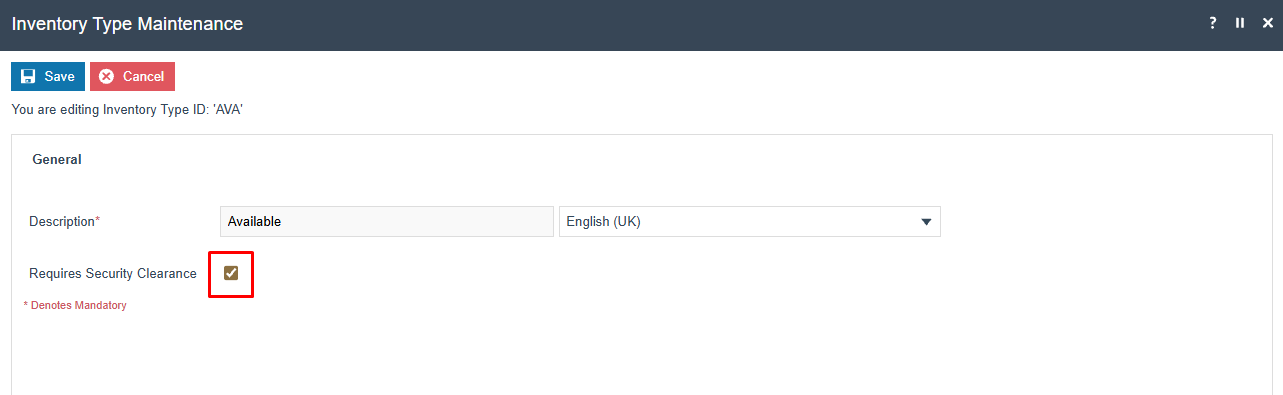
A new boolean property called Requires Security Clearance has been added to inventory types. By default, this property is set to false, meaning all inventory types are initially considered not to require security clearance and are allowed through the security API.
If an inventory type should be restricted, the Requires Security Clearance checkbox must be checked to enforce validation through the security API.
RFID Security API
The RFID Security API is used to validate security clearance. Following is the list of RFID Security APIs covered in this section:
- Check Security Clearance.
Check Security Clearance
Request
Request Service URL
POST/serialNumbers/checkSecurityClearance
Response
Response Body
There is no response body.
Request & Response Examples
Request:
POST http://[SWARM_LEADER_IP]/WebRestApi/rest/serialNumbers/checkSecurityClearance
{
  "serialNumbers": [
    "233340803772",
    "245187729587",
    "29837122184",
    "234007354800",
    "146889004390"
  ]
}
Response:
Status: 401 Unauthorized

{
  "status": "UNAUTHORIZED",
  "messageText": "Unauthorized serial numbers detected, outcome:Fail",
  "errorStatus": "401"
}
Response Status Codes
-
200 OK - All products are cleared and do not require security clearance.
-
500 Internal Server Error - An internal error occurred during processing.
-
401 Unauthorized - Some products require security clearance, or unknown serial numbers were provided.