How To Configure Serial Number Status Handling
Introduction
This guide outlines the configuration and technical implementation of Serial Number Status Handling within the Enactor POS and Estate Manager (EM). It covers how the system validates serial numbers during item entry and updates their inventory status upon transaction completion.
Serial Number Status Handling API
Inventory types for serial numbers can be configured in Serial Number Maintenance.
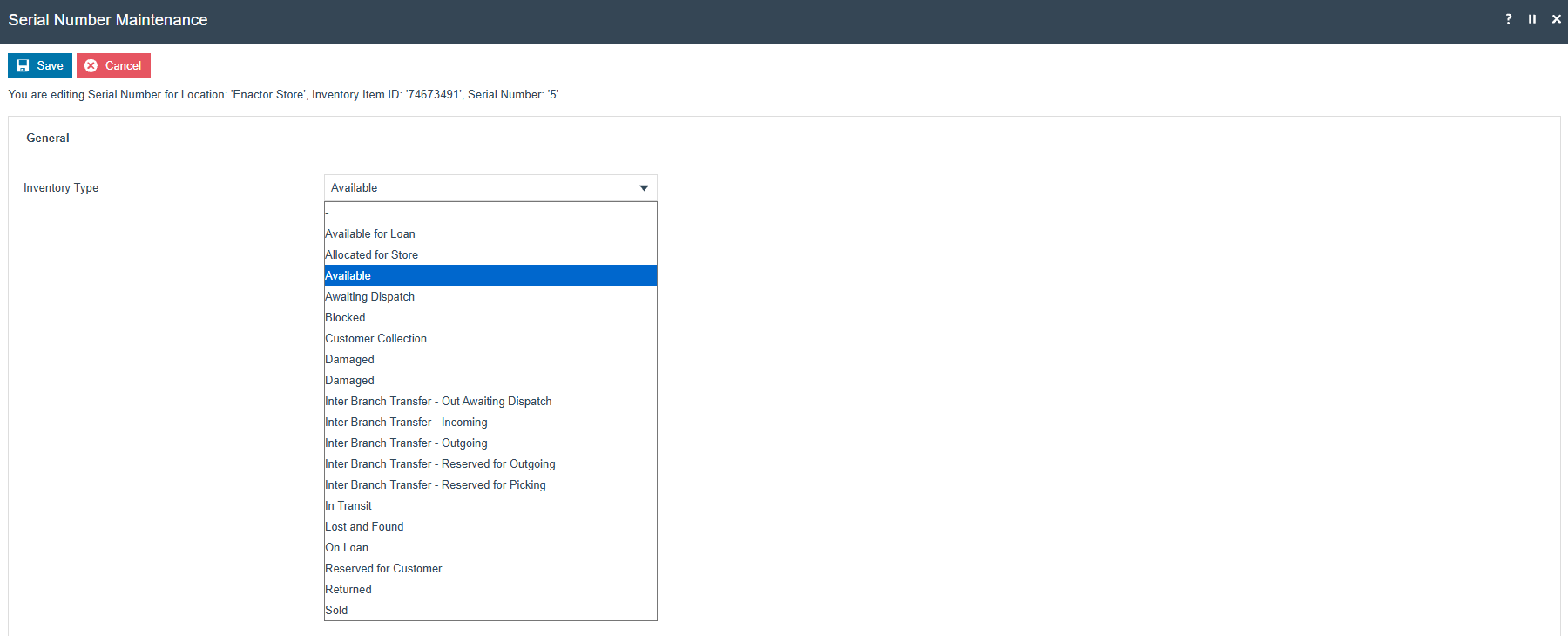
Validation and Update of Serial Numbers in POS
The behavior for validating or updating serial numbers, during item entry into the basket or at transaction completion, can be configured through POS Terminal Configurations in EM.
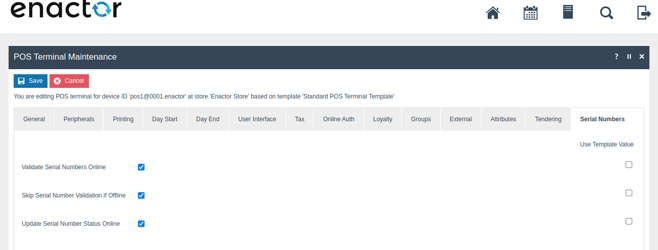
Online Serial Number Validation
If Validate Serial Number Online is enabled, then when items are added to the basket, the POS verifies whether the serial number's inventory type is allowed for sale by calling the SerialNumberStatusService.
The process Pos/Serial/CaptureProductSerial (through
InvokeOnlineValidateSerialNumber process call) invokes the service call
to SerialNumberStatusService [available for both SOAP and
REST,
InventoryManagementServiceV1_1.validateSerialNumber(..)/RestSerialNumberStatusService.ValidateSerialNumberStatus(..)]
Service Configuration
The validation service can be routed to an external system using a process connection extension.
EndpointReference configuration:
- ConnectedProcessId:
InventoryManagementPOS - ConnectionPointId:
ValidateSerialNumberStatus - OperationName:
validateSerialNumber
Alternatively, the OnlineSerialNumberValidationExtension process can be used to customize online validation.
Validate Serial Number Status
Request Example
Format: {{BaseUrl}}/WebRestApi/rest/serialNumbers/{productId}/{serialNumber}?locationId=0001
POST/ {{BaseUrl}}/WebRestApi/rest/serialNumbers/MB709SN-4/29323294055?locationId=0001
Response Examples
status 200

{
  "responseCode": "SUCCESS",
  "serialNumber": "37483605533",
  "productId": "MB709SN-4",
  "status": "AVA",
  "locationId": "0001",
  "messageId": "SUCCESS",
  "messageText": "The serial number 37483605533 is valid"
}
status 200

{
  "responseCode": "INCORRECT_INVENTORY_TYPE",
  "serialNumber": "29837122184",
  "productId": "MB709SN-4",
  "status": "SOL",
  "locationId": "0001",
  "errorCode": "INCORRECT_INVENTORY_TYPE",
  "messageId": "INCORRECT_INVENTORY_TYPE",
  "messageText": "The inventory type SOL is incorrect"
}
Configuring Allowed Inventory Types
- Allowed inventory types for sale can be configured using the
SellableInventoryTypesextension point. - Allowed inventory types for return can be configured using the
ReturnableInventoryTypesextension point.
Updating Serial Number Inventory Type (Online)
Serial number updates invoke in EndTransaction (through
UpdateSerialNumberStatus process call) Process.
Online serial number status updates have not been implemented in SCO. (PosSelfCheckout/Transaction/EndTransaction)
The POS process POSInventoryManagement/Serial/UpdateSerialNumberStatus
invokes SerialNumberStatusService [available for both SOAP and REST,
InventoryManagementServiceV1_1.updateSerialNumberStatus(..)/RestSerialNumberStatusService.UpdateSerialNumberStatus(..)].
Service Configuration
The update service can be routed to an external system using a process connection extension.
EndpointReference configuration:
- ConnectedProcessId:
InventoryManagementPOS - ConnectionPointId:
UpdateSerialNumberStatus - OperationName:
updateSerialNumberStatus
Update Serial Number Status
Request - Single Update
PUT/ {{BaseUrl}}/WebRestApi/rest/serialNumbers

{
  "valueDataList" : [ {
    "serialNumber" : "29837122184",
    "stockLedgerTransactionType" : "RTN",
    "status" : "DAM",
    "productId" : "MB709SN-4",
    "locationId" : "0001",
    "deviceId" : "aut.POS1@0001.enactor",
    "lastUpdatedByUser" : "1010",
    "transactionId" : "00010201002282506231451102"
  } ]
}
Request - Bulk Update
PUT/ {{BaseUrl}}/WebRestApi/rest/serialNumbers

{
  "valueDataList" : [ {
    "serialNumber" : "29837122184",
    "stockLedgerTransactionType" : "RTN",
    "status" : "DAM",
    "productId" : "MB709SN-4",
    "locationId" : "0001",
    "deviceId" : "aut.POS1@0001.enactor",
    "lastUpdatedByUser" : "1010",
    "transactionId" : "00010201002282506231451102"
  },
  {
    "serialNumber" : "87747448345",
    "stockLedgerTransactionType" : "RTN",
    "status" : "DAM",
    "productId" : "MB709SN-4",
    "locationId" : "0001",
    "deviceId" : "aut.POS1@0001.enactor",
    "lastUpdatedByUser" : "1010",
    "transactionId" : "00010201002282506231451102"
  } ]
}
Response
status 200