Enactor Script with Enactor Application Process Editor
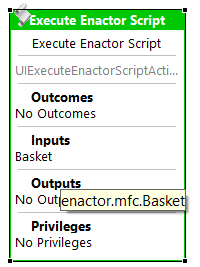
Inputs
To pass an input variable to a Enactor Script, follow these steps:
-
Add the input to the Action using the Application Editor.
-
Reference the input in your Enactor Script using the following convention:
- Trim the input at the last dot (.)
- Take the last segment
- Convert the first letter to lowercase
Example:
If the input is enactor.mfc.Basket, you would reference it in the script basket.
Outputs
To send a variable as output from a Enactor script, follow these steps:
-
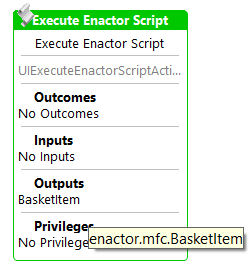
Add the output to the Action using the Application Editor.
-
Match the output name with the corresponding script variable:
- Use the script variable name as the last segment of the output path
- Capitalize the first letter of the script variable when defining the output
Example:
If your script defines a variable basketItem, the output variable can be named enactor.mfc.BasketItem
Outcomes
You can define outcomes in the Enactor script as
Outcome = "Success";
Then you can add Outcomes to the Action using the Application Process Editor.

Static Libraries
You can use functions provided by the Enactor Static Libraries within your scripts.
Locating Static Library Classes
To view the methods available in static library functions:
-
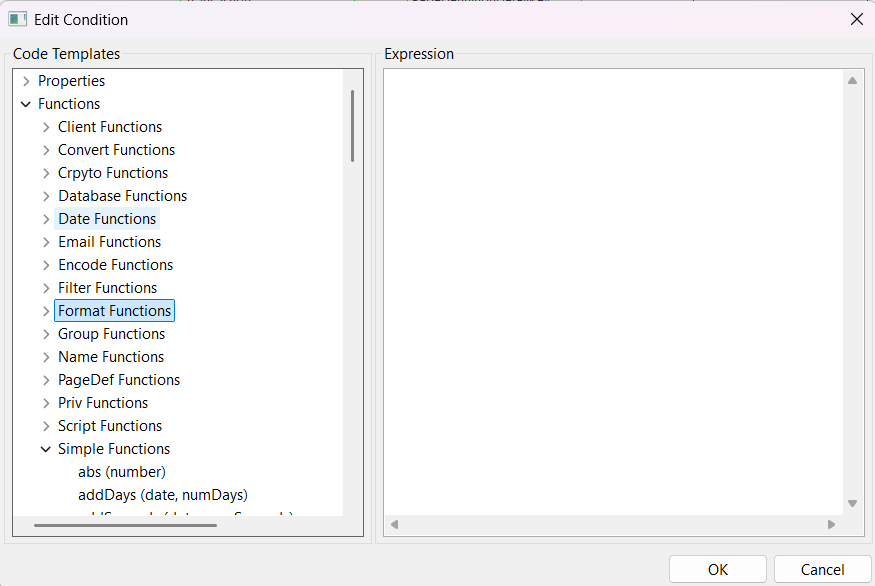
Double-click a link connecting two actions in an existing process.
-
Expand the Functions section to browse library methods, organized by category.
To use a method from a static library in your script:
- Select the relevant function
| Function Name | Classname |
|---|---|
| convert | com.enactor.coreUI.el.ConvertFunctionMapper |
| database | com.enactor.core.listFilters.DatabaseFunctionMapper |
| dates | com.enactor.core.utilities.DateUtils |
| com.enactor.coreUI.mail.EmailFunctionMapper | |
| encode | com.enactor.core.utilities.EncodeUtils |
| filter | com.enactor.core.listFilters.DatabaseFunctionMapper |
| format | com.enactor.coreUI.format.DataFormatterFunctionMapper |
| group | com.enactor.mfc.group.el.GroupFunctionMapper |
| name | com.enactor.coreUI.format.DataFormatterFunctionMapper |
| pagedef | com.enactor.coreUI.el.PageDefinitionFunctionMapper |
| priv | com.enactor.coreUI.el.PrivilegesFunctionMapper |
| simple | com.enactor.core.el.CoreApplicationProcessFunctionMapper |
| strings | com.enactor.core.utilities.StringUtils |
| xml | com.enactor.core.el.CoreApplicationProcessFunctionMapper |
- Call the desired method using the function name.
For example, to concatenate two strings:
Required function - Simple functions
Therefore, the script should be,
message = simple.concat("Hello ", name);