Messaging and Queues
Queueing System - Transaction Flow
POS
POS Sale Process
→XML Basket
POS Transactions
Queue Connector
→
Back Office
Queue Connector
Server Transactions
Inbound Documents
Transaction Processing
TransactionsOut
→Queue Connector
Store Reports
Local Archive
Other Reporting Tables
→
Estate Manager
Queue Connector
EstateManager Transactions
Inbound Documents
Transaction Processing
TransactionsOut
→Feeds to external systems
Central Reports
Transaction Archive
Other Reporting Tables
Transaction data flows through three stages:
| Stage | Components | Outputs |
|---|---|---|
| POS | POS Sale Process creates XML Basket, writes to POS Transactions queue, sends via Queue Connector | Transaction message to Back Office |
| Back Office | Queue Connector receives into Server Transactions, processes via Inbound Documents and Transaction Processing | Store Reports, Local Archive, Other Reporting Tables, forwards via TransactionsOut queue |
| Estate Manager | Queue Connector receives into EstateManager Transactions, processes via Inbound Documents and Transaction Processing | Central Reports, Transaction Archive, Other Reporting Tables, TransactionsOut feeds to external systems |
Messaging System
InventoryTransactions
→Queue Connector
InventoryTrans2InboundDocum…
Variables None
Connected Process
Inventory Transaction Processing
Outputs InventoryTransactions
Inbound Queues InventoryTP
InventoryTransactionsOut
Example: InventoryTransactions queue connects to Queue Connector (InventoryTrans2InboundDocum), which feeds into Connected Process (Inventory Transaction Processing) with InventoryTP inbound queue, outputting to InventoryTransactionsOut.
Message Service Interfaces
Message Service Session Interface - Creates Connections (Message Service Connection Interface):
- Create various forms of messages - Data (bytes), Text
- Subscribe and Unsubscribe
Message Service Connection Interface:
- Open/Close
- Listener support
- Notification support
Current Implementations
- Database
- Document Processor
- File System - Files, Batched Files, Zip, Append to File
- SFTP
- HTTP
- JMS (Talend, MQ, AWS SQS)
- Kinesis
- Kafka
Queue Connectors - Enactor Processes to pass data between queues and connected processes.
Enactor Connected Process Designer
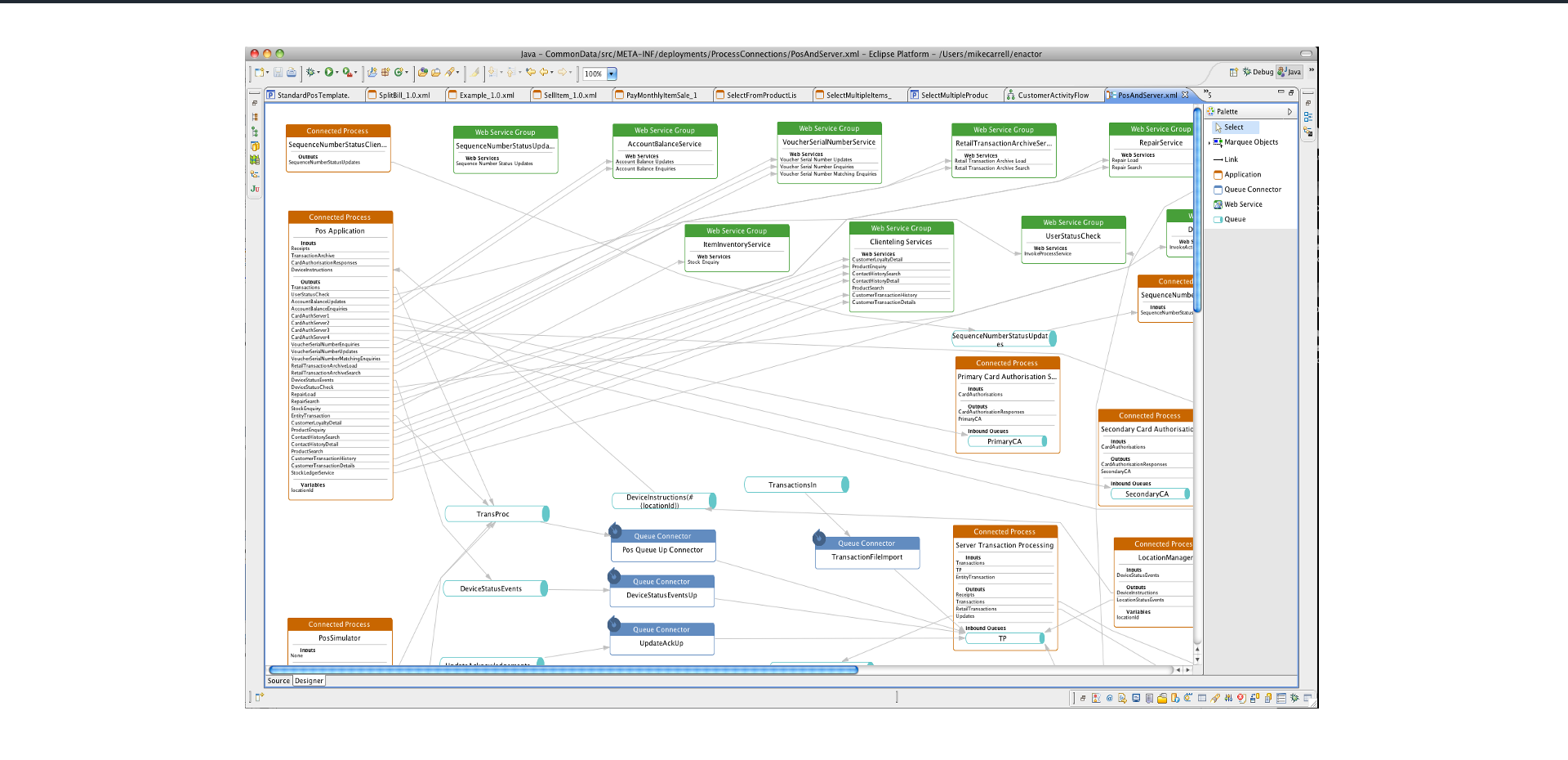
A visual Eclipse-based IDE for designing and connecting business processes. Key components visible in the designer:
- Connected Processes - POS Application, Server Transaction Processing, Primary and Secondary Card Authorisation, Location Manager, POS Simulator
- Queue Connectors - POS Queue Up, DeviceStatusEventsUp, UpdateAckUp, TransactionFileImport
- Web Service Groups - AccountBalanceService, VoucherSerialNumberService, RetailTransactionArchiveService, RepairService, ItemsInventoryService, ClientListingServices, UserStatusCheck
This tool provides a visual way to design the connections between all the microservices and processes in the Enactor platform.
Further Reading
| Document | Description |
|---|---|
| Alerts and Monitoring | Configuring system alerts and monitoring |
| Transaction Recovery | Transaction recovery procedures |