Organisation Structure

Organisation Structure
Slide29


Organisation Structure - Topics

  • Overview of Organisation Configuration - Company, Regions, Countries/Currencies/Locales
  • Organisation Structure as a basis for configuration
  • Other Groups - MM Groups, Menu Groups, Price Groups, Fascias

Organisation Structure - Objectives and Exercises

Objectives

At the end of this session, you will be able to:

  • Understand the purpose of Company configuration data
  • Understand and explain Enactor Group Structures including regions, MM Groups, price and menu groups
  • Configure group hierarchies to reflect a simple retail organisation
  • Understand Country, currency and locale data for managing an international estate
  • Understand how other configuration data fits into the organisation structure so that the right information is maintained at the right level

Practical Exercises

  • Region Configuration exercise
  • MM Group Configuration exercise

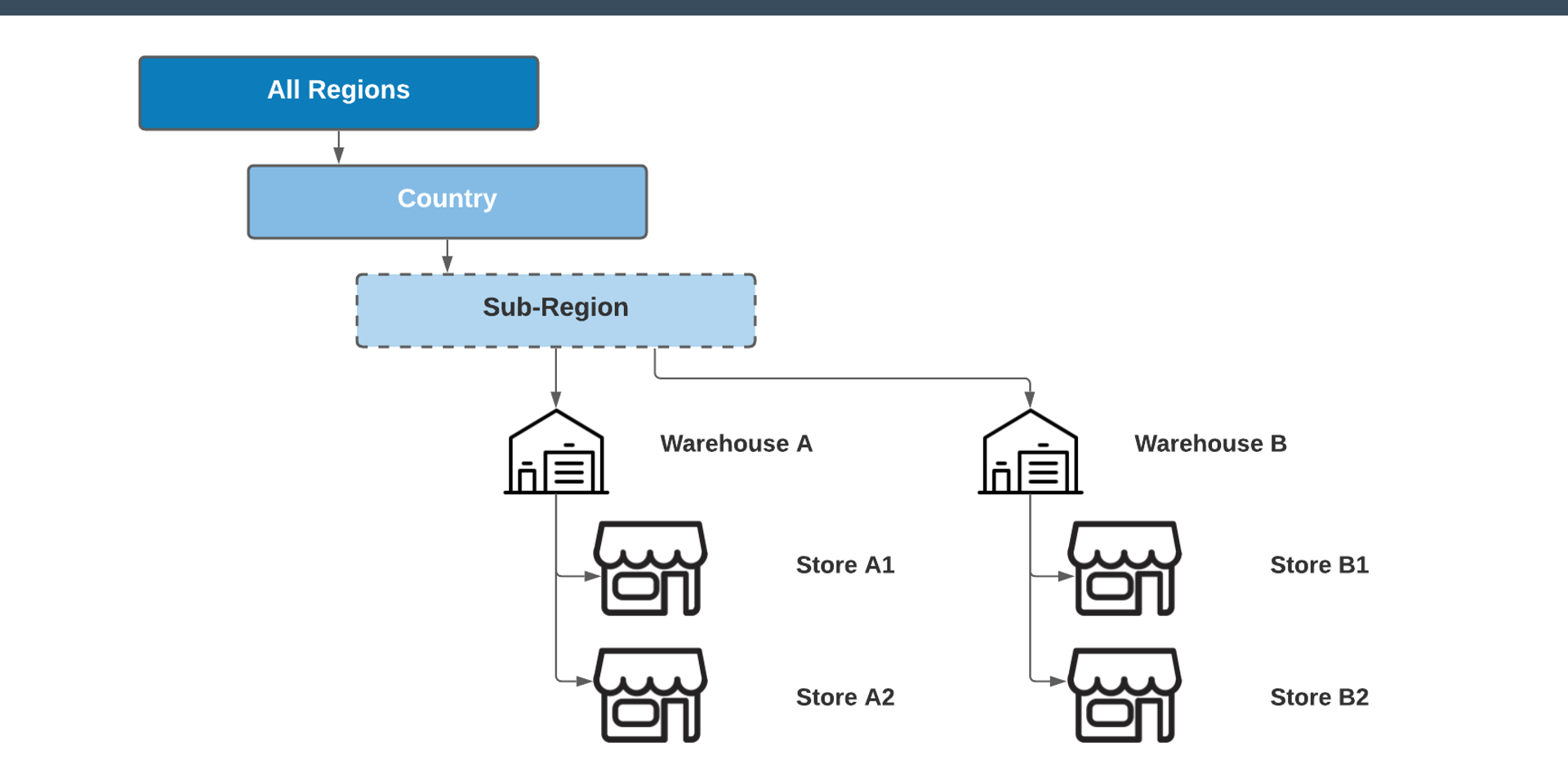
Organisation Structure - Example

Organisation Hierarchy Example


Organisation Structure - Regional Overview
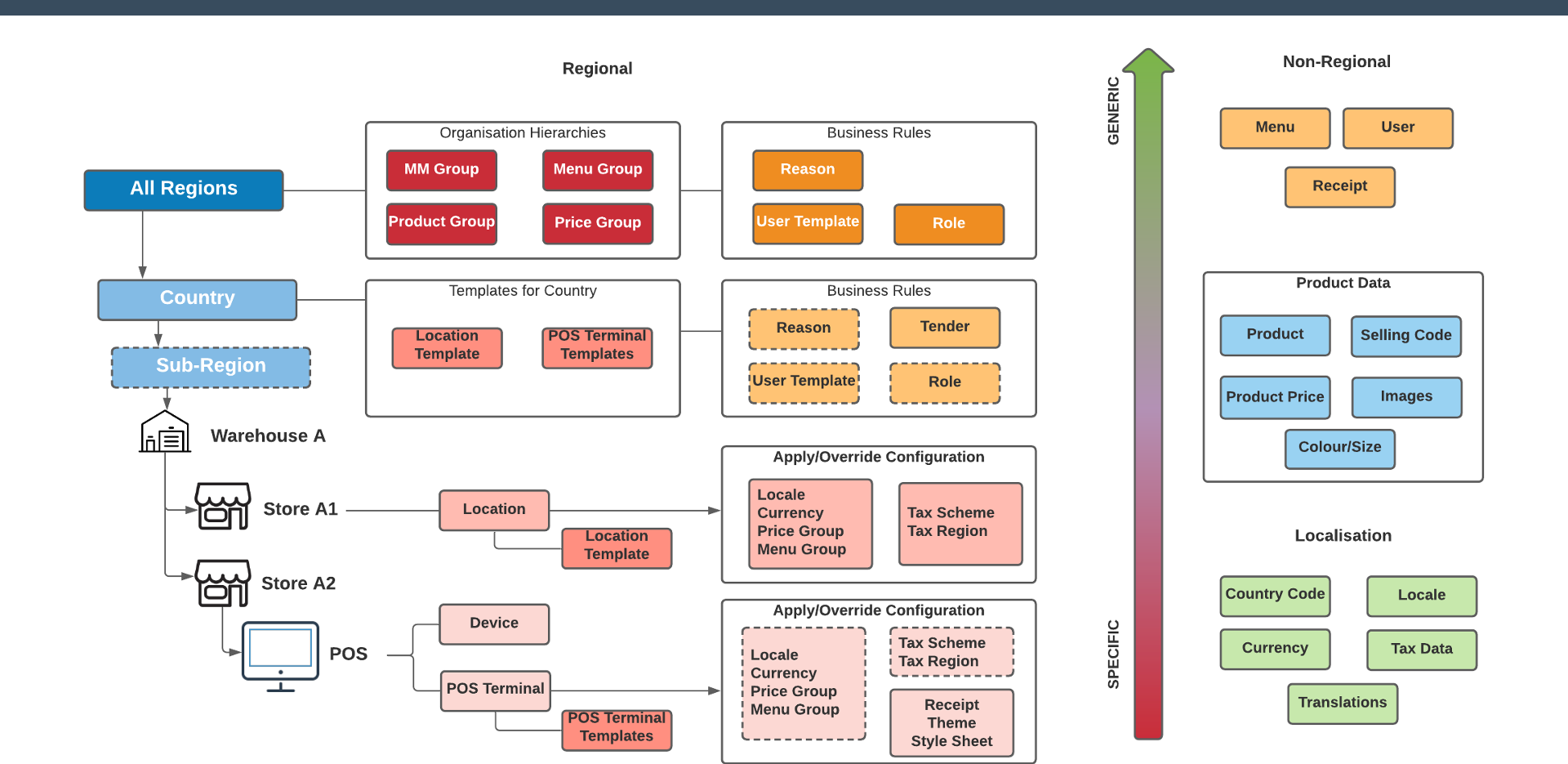
Regional Configuration Overview


Organisation Structure - IDs and Descriptions - Best Practices

Most entities have both an ID and a Description/Name:

ID

  • Internal unique identifier
  • Always mandatory
  • Recommended: use upper case with underscores instead of spaces

Description

  • Freeform and human-friendly
  • Usually mandatory
  • Recommended: should be unique
  • Often translated into multiple languages

Please incorporate your TrainX ID into any IDs you create to simplify identification.


Organisation Structure - Exercise 1: Region Configuration

This exercise will be carried out as a demonstration.

  1. Log on to the Estate Manager with your TrainX credentials
  2. Navigate to Group Maintenance and select the Region Group type
  3. Select the United Kingdom Country within the region structure
  4. Create a Sub-region of the United Kingdom
  5. Assign it your TrainX ID with an identifiable name
  6. Save changes

Organisation Structure - Exercise 2: MM Group Configuration

  1. Log on to the Estate Manager
  2. Navigate to Group Maintenance and select the MM Group type
  3. Create a new MM Group Hierarchy with your TrainX ID assigned to the "All" Region
  4. Add at least two levels of categories with appropriate IDs and descriptions, modelled on a realistic retail type (e.g. Department Store, Fashion, Grocery)
  5. Save the group structure

Discussion

  • Why is Organisation Structure configured first?
  • What is the purpose of the region and MM Group structures?
  • What does MM stand for?

Further Reading

For additional information and further reading on Organisation Structure, please see the following guides:

DocumentDescription
How to: Create a New UserCreating and configuring users, roles and templates
How to: CompanyConfiguring the base company record
How to: Country CodesConfiguring country codes
How to: CurrencyConfiguring currencies
How to: LocaleConfiguring locales
How to: GroupsConfiguring group hierarchies