Overview of Solution
Overview of Solution
Overview of Solution - Components
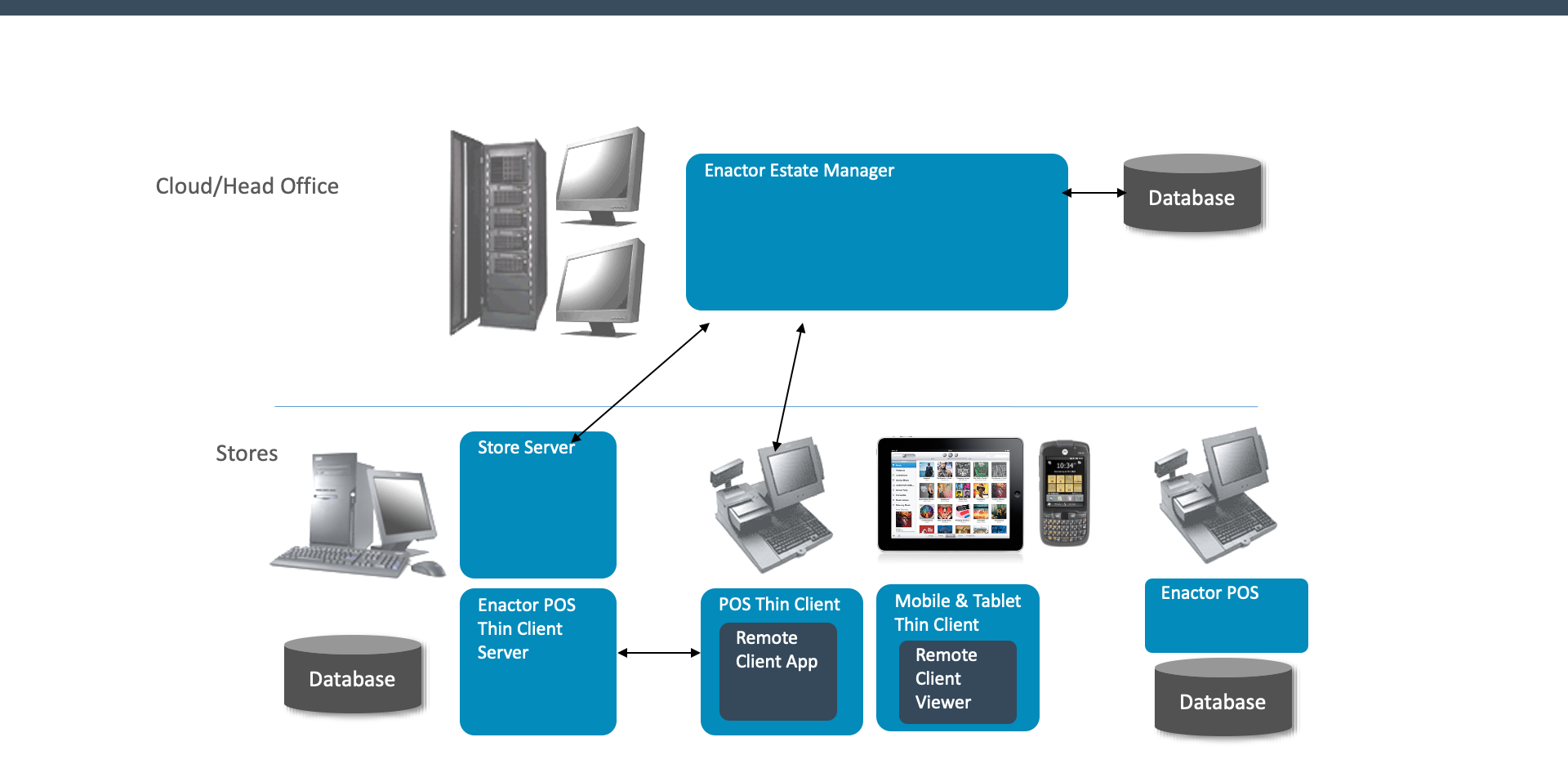
Cloud / Head Office
- Estate Manager
Central management application for configuring, monitoring, and administering the Enactor estate
Store
- Back Office (Store Server)
In-store server providing local data services, broadcasting, and store-level processing - Mobile Server + Thin Clients
POS Thin Client Server hosting browser-based and mobile/tablet POS clients (Remote Client App and Remote Client Viewer) - POS
Standalone Enactor POS application with its own local database for point-of-sale operations
Overview of Solution - Exercise
Explain the components in an Enactor solution, their key purposes and how they fit together
What are the purposes of the Enactor Estate Manager?
What are the purposes of the Enactor POS?
What are the purposes of the Enactor Store Server/Back Office?
Why do we carry out configuration at the Estate Manager rather than the store?
Where would integration with external solutions be carried out, for example:
- Carrying out an inventory lookup when taking an order?
- Receiving product and price updates?
- Exporting transaction records?