Merchandise Data

Merchandise Data
Slide 29


Configuration Topics

This session covers the following Product Data configuration topics:

  • MM Groups - Merchandise Management Groups for product categorisation and reporting
  • Products - Merchandise Products and Style Colour Size Products
  • Product Prices - price data by price group, location, and date range
  • Selling Codes - barcodes and short codes used at the POS
  • Sizes / Size Ranges - size data for structured products
  • Colours / Colour Ranges - colour data for structured products
  • Product Groups - ad-hoc product groupings for promotions and rich product search

Objectives

Objectives

At the end of this session, you will be able to:

  • Understand and explain the configuration entities used to manage product information, and how they relate to each other
  • Understand and explain the purposes and structure of the main product types: MerchandiseProduct, StyleColourSizeProduct, and SKUProduct, including the main product configuration settings
  • Understand how price data may be structured to apply the correct prices across the estate
  • Configure Merchandise and Style/SKU Products, including prices, selling codes, MM Group, and Colour/Size data

Practical Exercises

  • Merchandise Product Configuration exercise
  • Style/SKU Product Configuration exercise

Merchandise Data

Merchandise Data


Product Data Relationships - Simple Product
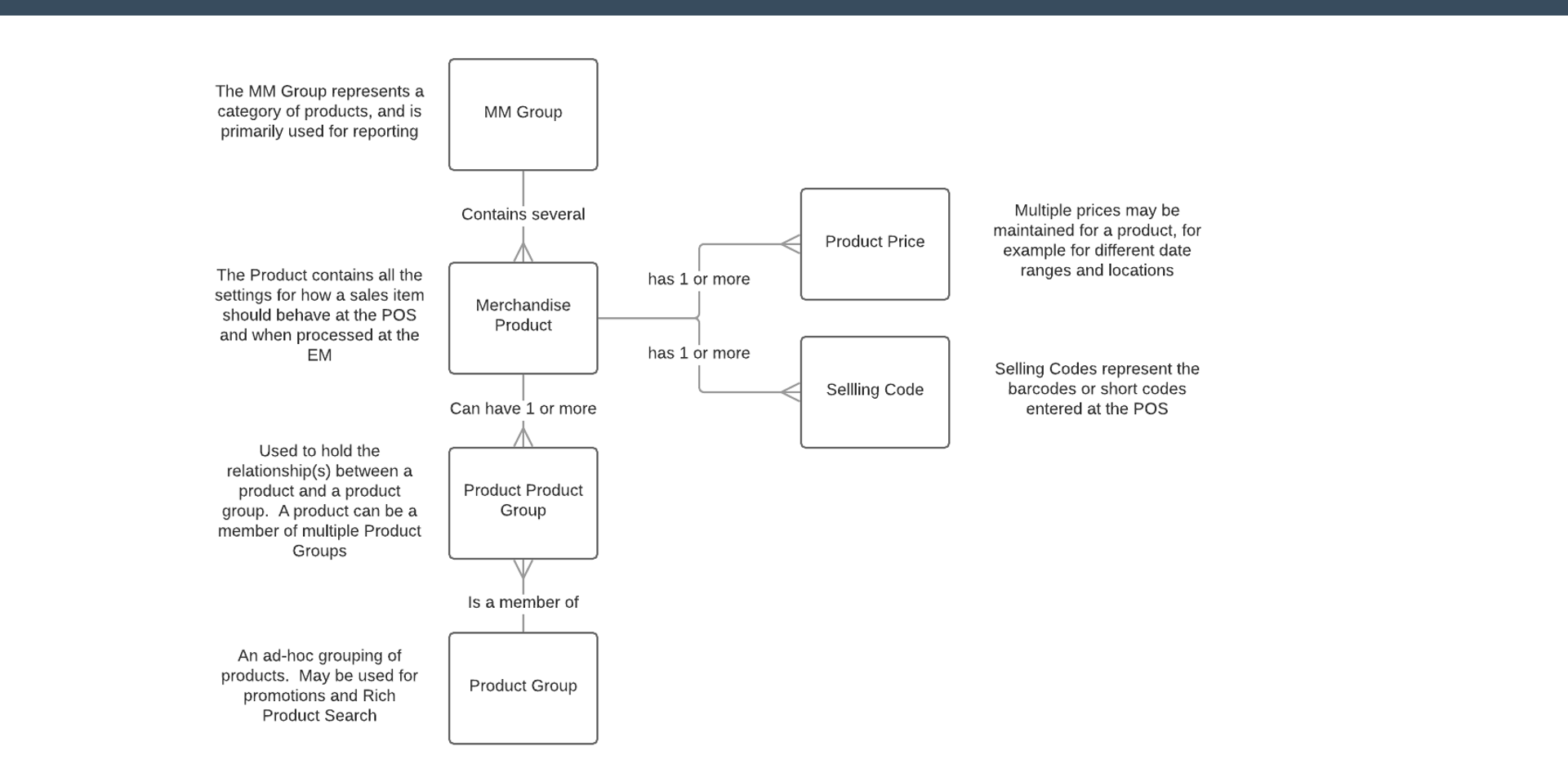
Product Data Relationships - Simple Product

EntityDescription
MM GroupRepresents a category of products, primarily used for reporting. Contains several Merchandise Products.
Merchandise ProductContains all the settings for how a sales item should behave at the POS and when processed at the EM.
Product PriceMultiple prices may be maintained for a product - for example, for different date ranges and locations.
Selling CodeRepresents the barcodes or short codes entered at the POS.
Product GroupAn ad-hoc grouping of products. May be used for promotions and Rich Product Search.

Product Data Relationships - Structured Product
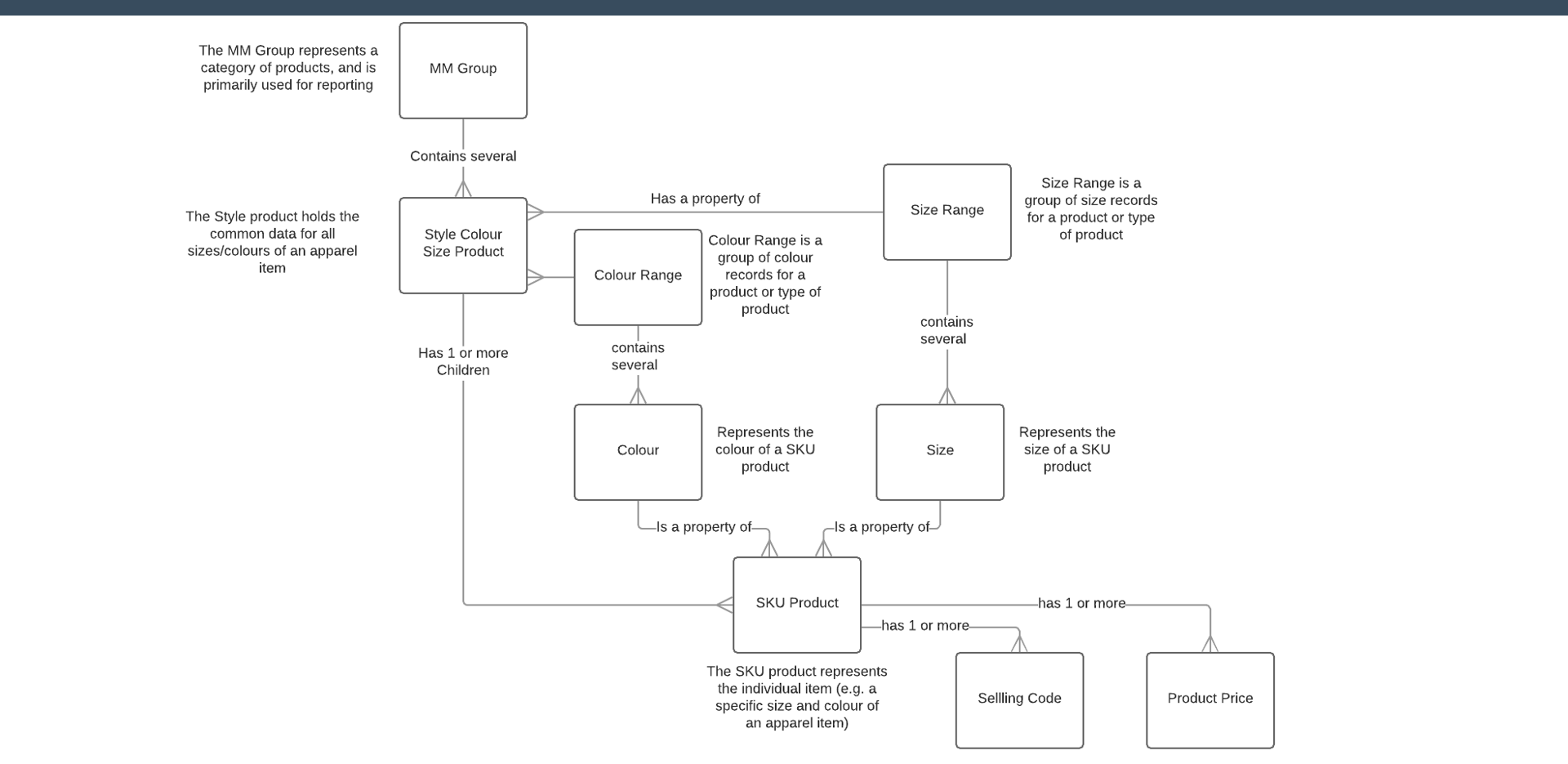
Product Data Relationships - Structured Product

EntityDescription
Style Colour Size ProductHolds the common data for all sizes and colours of an apparel item. Has a Size Range and a Colour Range. Has one or more SKU Product children.
Size RangeA group of size records for a product or type of product. Contains several Sizes.
Colour RangeA group of colour records for a product or type of product. Contains several Colours.
SKU ProductRepresents the individual item - e.g. a specific size and colour of an apparel item. Has one or more Selling Codes and Product Prices.

Product Price Data Structure

Price Group

Organise locations into groups, for example by:

  • Region (e.g. Country)
  • Store Type (e.g. Out of Town vs High Street)
  • Price Model (e.g. Outlet stores)

Location Prices

Normally used by exception only - will take precedence over Price Group prices. Used for scenarios such as store opening or closing.

Price Date Ranges

Prices must have a Start Date; End Date is optional. If there are multiple valid overlapping prices, the POS will select the price that started most recently.


Exercise 4 - Products

  1. What are the main types of Products in Enactor?
  2. What are their purposes?
  3. Draw a diagram of an example Style/SKU structure for a fashion product.
  4. Describe how price data is structured.

Exercise 5 - Merchandise Product

  1. Create a new Merchandise Product with an ID of MERCH-x (use your TRAINx ID).
  2. Give your product a Description and a Long Description (make it identifiable as yours).
  3. Assign your product to an MM Group (Merchandise Category).
  4. Add a Selling Code to your product.
  5. Give your product a Retail Price - use the United Kingdom Price Group and GBP currency.
  6. Broadcast your product data to your POS (this will be done once for the group): Use the Retail Product Data Predefined Broadcast; Set the Changes From Date to approximately 1 hour ago
  7. Once broadcast and received by your POS, try selling it by entering the product or barcode number. Does it work as expected?
  8. Try making some changes to your product, for example: Set a minimum age restriction; Add an image; Add a prompt for data capture
  9. Broadcast your updated product to your POS and confirm the changes have taken effect.

Exercise 6 - Style/SKU Product

  1. Create a new Style Colour Size Product with an ID of STYLE-x (use your TRAINx ID).
  2. Give your Style Product a Description and a Long Description.
  3. Give your Style Product a Price for the United Kingdom Price Group.
  4. Assign your product to an MM Group (Merchandise Category).
  5. Set the SKU information for your product: Colour Range - use Mens' Shirts Colours; Size Range - use Mens' Shirts Sizes
  6. Add a range of SKUs to your product - add at least two colour and two size variations.
  7. Let the system assign the SKU numbers - note them down.
  8. Save and broadcast to your POS.
  9. Test selling the SKUs.

Further Reading

For additional information and further reading on Merchandise Data, please see the following guides:

DocumentDescription
How to: Configure Merchandise ProductsCreating and configuring merchandise products
How to: Configure Product PricesConfiguring product prices across price groups
How to: Configure Product Style, Colour and SizeConfiguring Style Colour Size products and SKUs