Store and POS Setup

Store and POS Setup
Slide 19


Objectives

Objectives

At the end of this session, you will be able to:

  • Understand and explain the purposes of and relationships between Locations, Location Templates, Devices, POS Terminals, and POS Terminal Templates
  • Understand the main configuration settings managed using the Location and Location Template
  • Understand the main configuration settings managed using the POS Terminal and POS Terminal Template
  • Configure a Store Location and a set of POS Terminals within that Location
  • Install a POS using the Enactor POS MSI (basic installation only)

Practical Exercises

  • Location, Device, POS Terminal Configuration Exercise
  • POS Installation Exercise

Configuration Topics

Configuration Topics

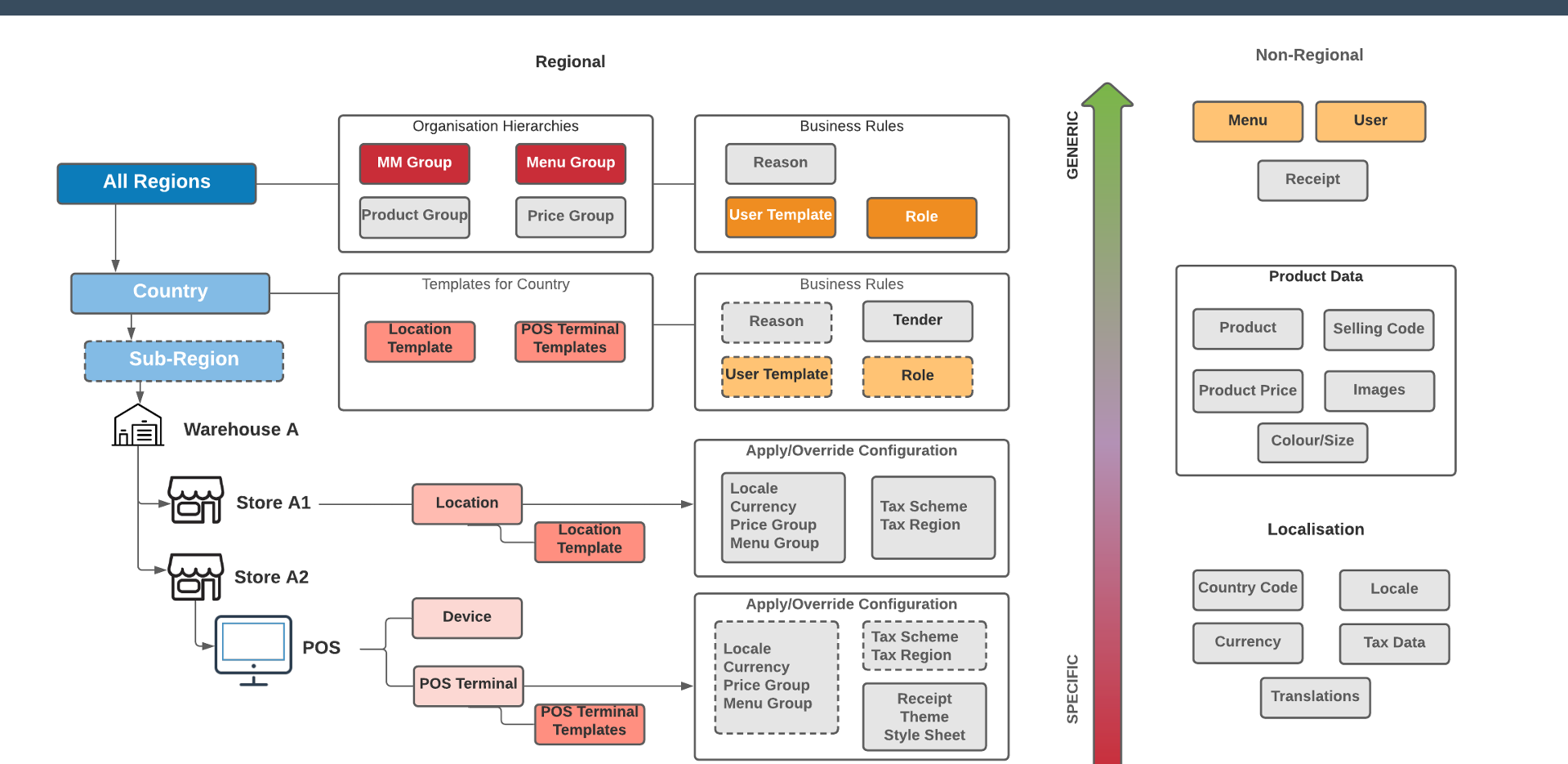
  • Location - represents a physical store or warehouse
  • Location Template - contains configuration settings common to a set of locations
  • Device - represents a physical device such as a POS or server
  • POS Terminal - represents a physical POS
  • POS Terminal Template - contains configuration settings common to a set of POS Terminals

Other Topics

  • POS Setup

Architecture

Store and POS Architecture


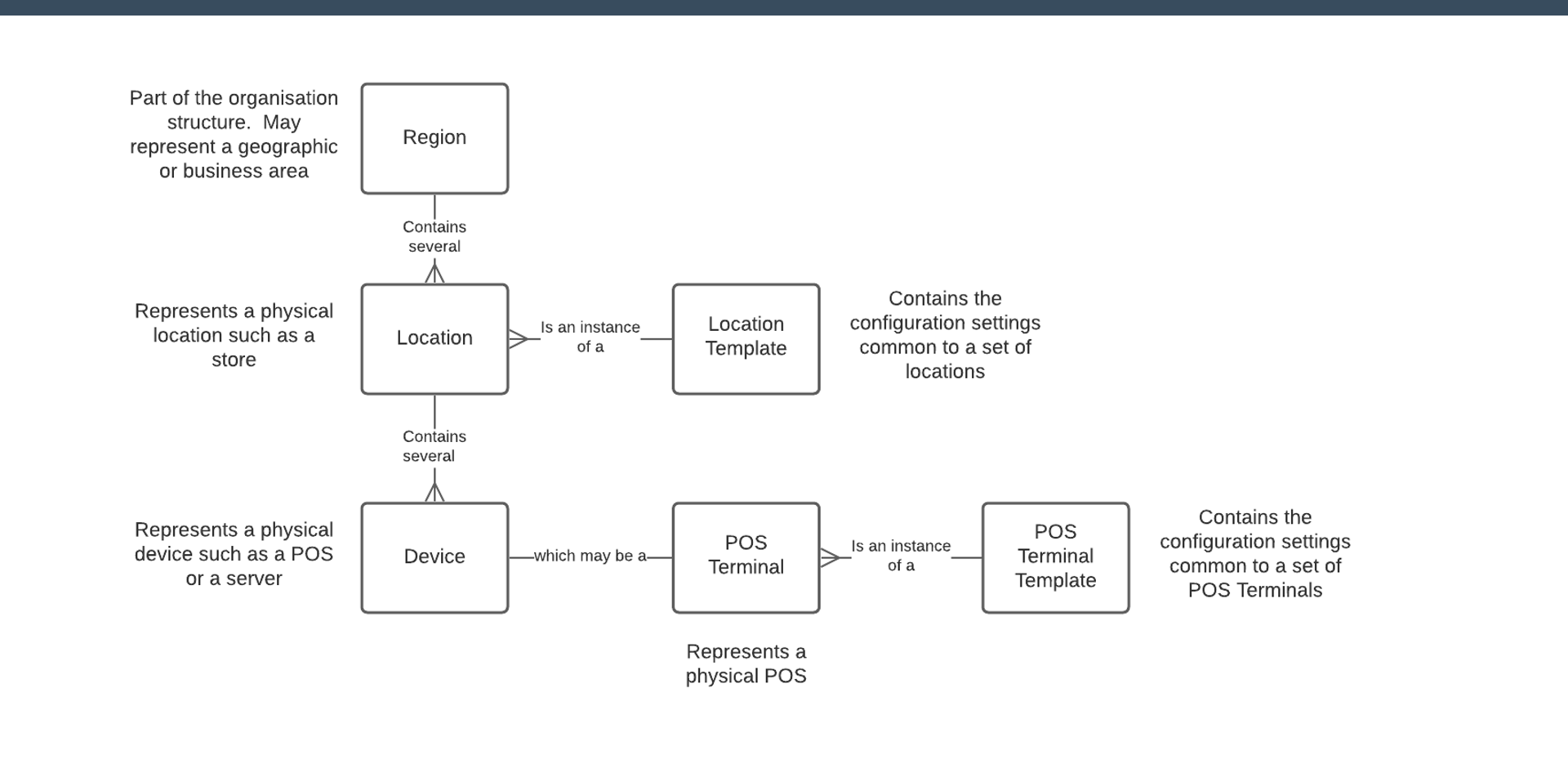
Location, Device and POS Terminal Relationships
Location, Device and POS Terminal Relationships

EntityDescription
RegionPart of the organisation structure. May represent a geographic or business area. Contains several Locations.
LocationRepresents a physical location such as a store. Is an instance of a Location Template. Contains several Devices.
Location TemplateContains the configuration settings common to a set of locations.
DeviceRepresents a physical device such as a POS or a server.
POS TerminalRepresents a physical POS. Is an instance of a POS Terminal Template.
POS Terminal TemplateContains the configuration settings common to a set of POS Terminals.

Exercise 3 - Store and POS Configuration

  1. Draw a diagram representing the configuration of a model store. Use these IDs: Location: LOC-TRAINx (note this down - you will need it later); Device/POS Terminal: POS-TRAINx (note this down - you will need it later)
  2. Set up the configuration for your model store using this template: Location Template: STORE_TEMPLATE_UK (UK Store Template)
  3. Give your location specific configuration, including: Branch number (use x from your TRAINx ID); Name and Address; Assign it to the United Kingdom region; Set the Store to Live; Set the Price Group to United Kingdom (this is actually set on the template); Add a message to the receipt footer (trailer)
  4. Create your Device with Device ID POS-TRAINx. Device should have a type of POS and your location.
  5. Create your POS Terminal POS-TRAINx: Use POS Terminal Template: RETAIL_MOBILE_POS_TEMPLATE (Standard Mobile POS Terminal Template)
  6. Give it specific configuration, including: Description; Terminal Number (use x from your TRAINx ID); Set the POS Terminal to use your Menu Group

Exercise 3a - POS User Interface

  1. Set the following configuration on your POS Terminal.
  2. User Interface - General: Menu Group - use yours (TRAINx)
  3. User Interface - Branding/Style: Parent Theme - NextGen; Theme - NextGen1024x768; Operator View Style Sheet - The Works 1024x768
  4. Save and broadcast the changes.
  5. Restart your POS: What does the UI look like? Can you find your menu item(s)?

POS Setup Overview

Pre-Requisites

  • Operating System
  • Database
  • Installer.ini
  • Drivers (e.g. JPOS)

POS MSI Installation

Initial Connection to Estate Manager

Master Data Broadcast

Test


POS Internal Architecture

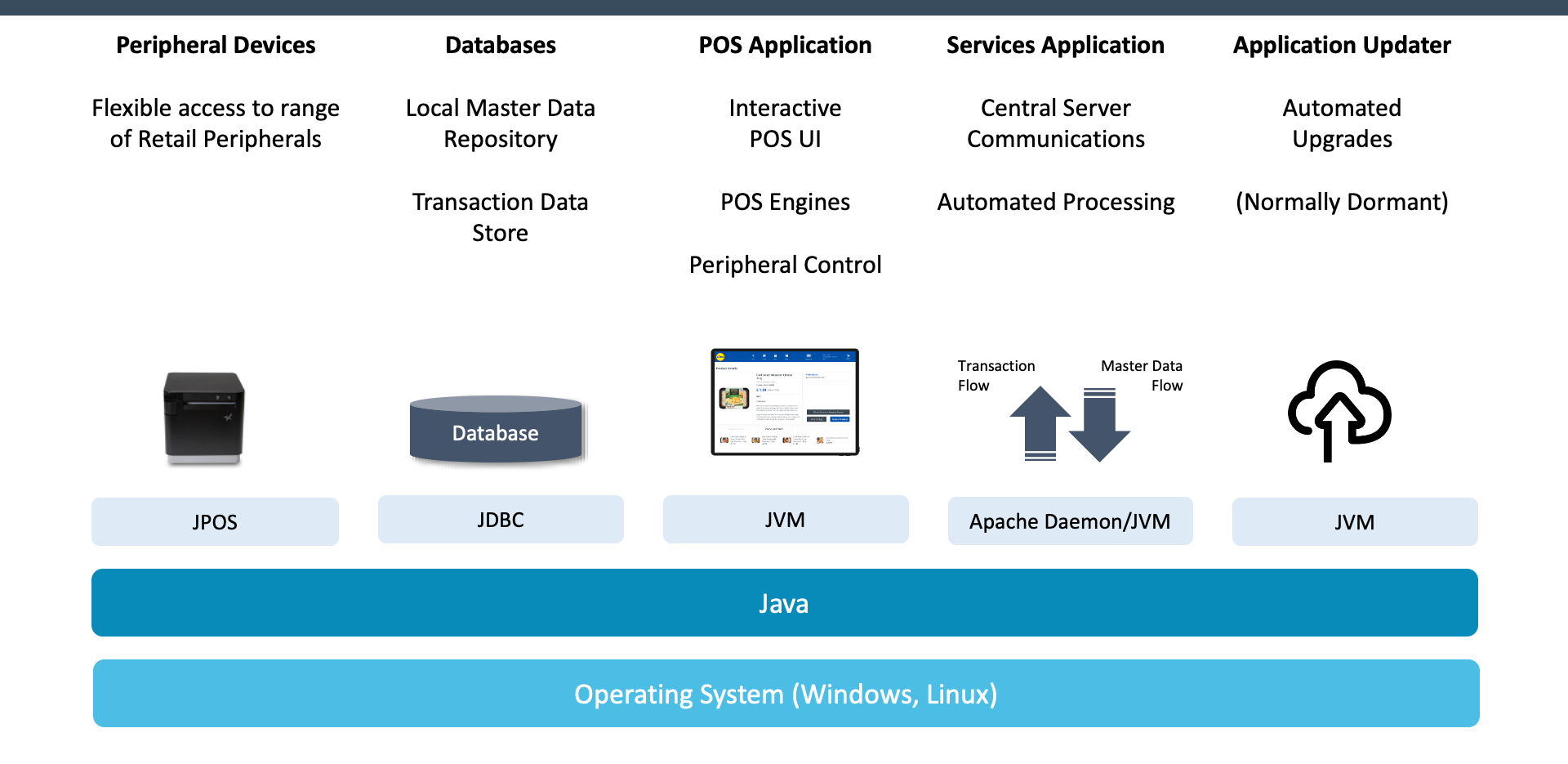
POS Internal Architecture

ComponentTechnologyDescription
Peripheral DevicesJPOSFlexible access to a range of retail peripherals
DatabasesJDBCLocal master data repository and transaction data store
POS ApplicationJVMInteractive POS UI, POS Engines, and Peripheral Control
Services ApplicationApache Daemon / JVMCentral server communications, automated processing, and transaction/master data flow
Application UpdaterJVMAutomated upgrades (normally dormant)

The full stack runs on Java over Windows or Linux.


Further Reading

For additional information and further reading on Store and POS Setup, please see the following guides:

DocumentDescription
How to: Configure LocationsConfiguring store locations and location settings
How to: Configure DevicesConfiguring devices within a location
How to: Configure POS TerminalsConfiguring POS terminals and terminal settings