Store and POS Configuration

Store and POS Configuration
Slide 1


Configuration Topics

  • Location
  • Location Template
  • Device
  • POS Terminal
  • POS Terminal Template

Objectives and Exercises

Objectives

At the end of this session, you will be able to:

  • Understand and explain the purposes of and relationships between Locations, Location Templates, Devices, POS Terminals and POS Terminal Templates
  • Understand the main configuration settings managed using the Location / Location Template
  • Understand the main configuration settings managed using the POS Terminal / POS Terminal Template
  • Configure a Store Location and a set of POS Terminals within that Location
  • Install a POS using the Enactor POS MSI (basic installation only)

Practical Exercises

  • Location, Device, POS Terminal Configuration Exercise
  • POS Installation Exercise

Stores and POS Devices

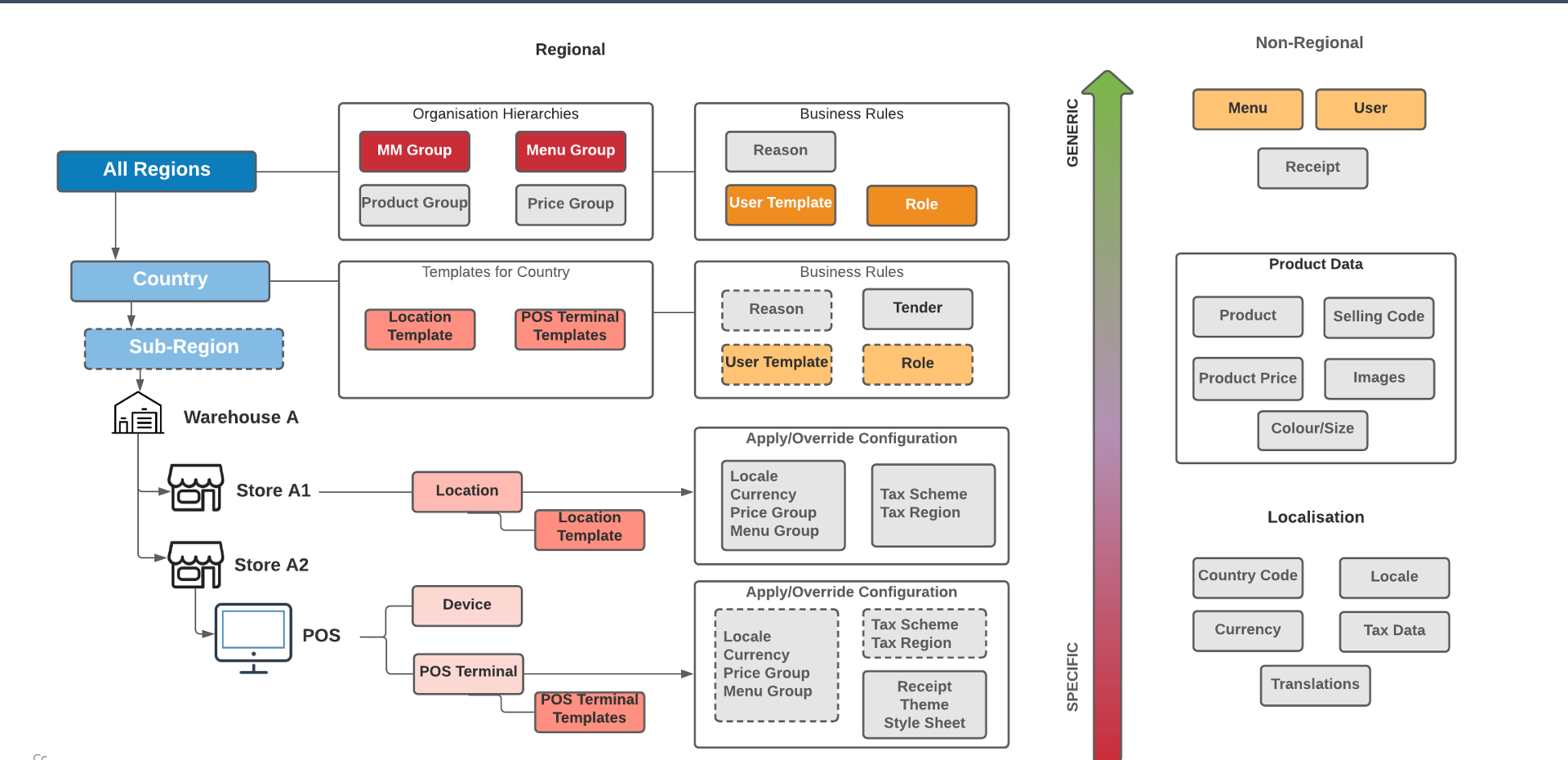
Stores and POS Devices Configuration Hierarchy

Regional Configuration (Generic to Specific)

  • All Regions - Organisation Hierarchies: MM Group, Menu Group, Product Group, Price Group
  • Country - Templates: Location Template, POS Terminal Templates
  • Country - Business Rules: Reason, Tender, User Template, Role
  • Store (Location) - Apply/Override: Locale, Currency, Price Group, Menu Group, Tax Scheme, Tax Region
  • POS (Device > POS Terminal) - Apply/Override: Locale, Currency, Price Group, Menu Group, Tax Scheme, Tax Region, Receipt, Theme, Style Sheet

Non-Regional Configuration

  • Menu, User, Receipt
  • Product Data - Product, Selling Code, Product Price, Images, Colour/Size
  • Localisation - Country Code, Locale, Currency, Tax Data, Translations

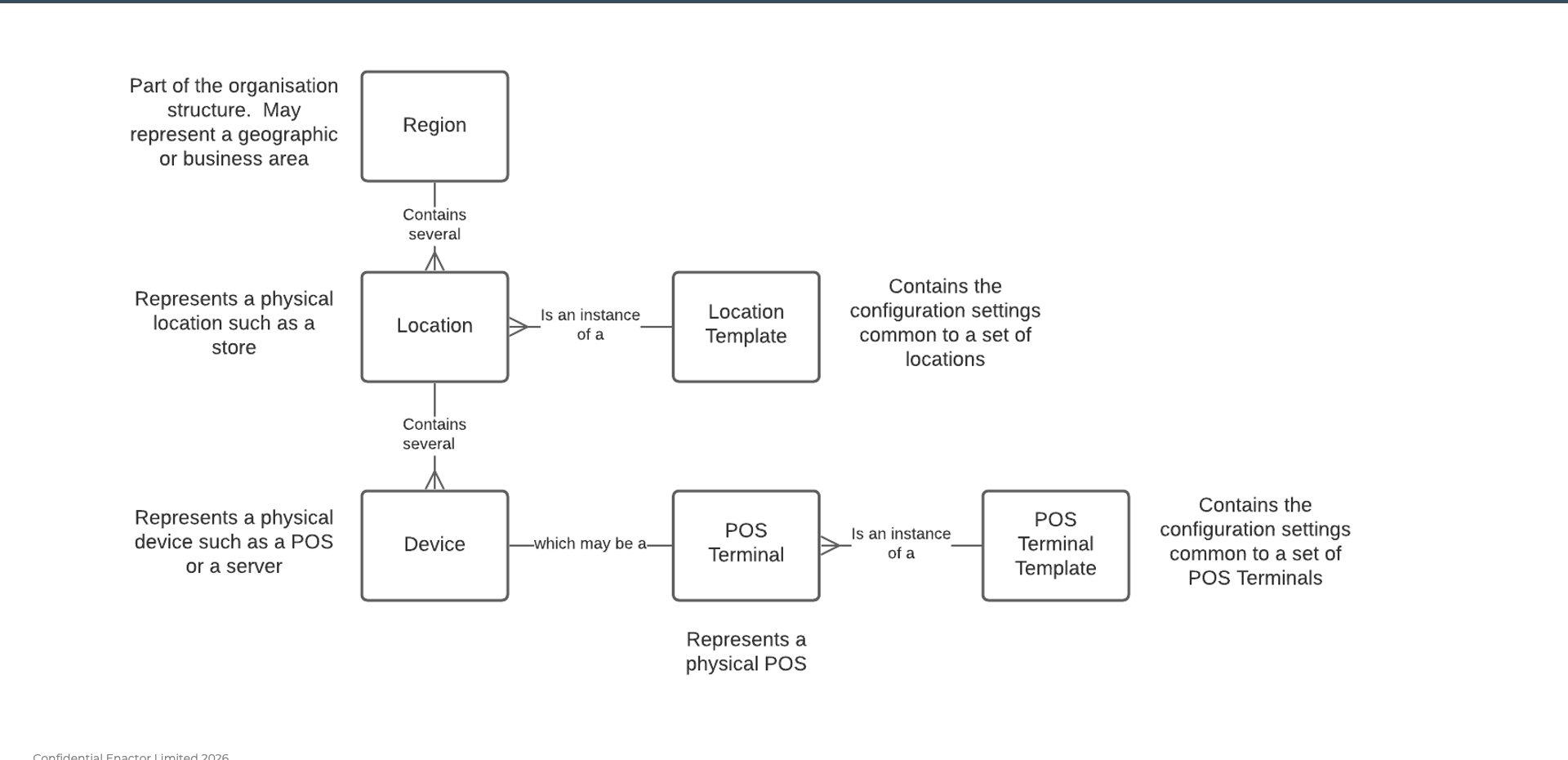
Location, Device and POS Terminal Relationships
Location, Device and POS Terminal Relationships

  • Region - Part of the organisation structure. May represent a geographic or business area
  • Location - Represents a physical location such as a store. A Region contains several Locations
  • Location Template - Contains the configuration settings common to a set of Locations. A Location is an instance of a Location Template
  • Device - Represents a physical device such as a POS or a server. A Location contains several Devices
  • POS Terminal - Represents a physical POS. A Device may be a POS Terminal
  • POS Terminal Template - Contains the configuration settings common to a set of POS Terminals. A POS Terminal is an instance of a POS Terminal Template

Exercise 1: Store and POS Configuration

Store Setup - Exercise 1

  1. Draw a diagram representing the configuration of a model store. Use these IDs: Location: LOC-TRAINx (note this down, you will need it later); Device/POS Terminal: POS-TRAINx (note this down, you will need it later)
  2. Set up the configuration for your model store. Use these templates: Location Template: STORE_TEMPLATE_UK (UK Store Template); POS Terminal Template: RETAIL_FIXED_POS_TEMPLATE_UK (UK Fixed POS Terminal Template)
  3. Give your location some specific configuration, including: Branch number (use x from your TRAINx ID); Name and Address; Assign it to the United Kingdom region; Set the Store to Live; Set the Price Group to United Kingdom; Add a message to the receipt footer (trailer)
  4. Create your Device with Device ID POS-TRAINx. Device should have a type of POS and your location.
  5. Create your POS Terminal POS-TRAINx and give it specific configuration including Description and Terminal Number.

Exercise 2: POS User Interface

Store Setup - Exercise 2

  1. Set the following configuration on your POS Terminal
  2. User Interface - General: Menu Group - use yours (TRAINx)
  3. User Interface - Branding/Style: Parent Theme - NextGen; Theme - NextGen1024x768; Operator View Style Sheet - [Client Specific]
  4. Save and Broadcast the changes
  5. Restart your POS: What does the UI look like?; Can you find your menu item(s)?

Further Reading

For additional information and further reading on Store and POS Configuration, please see the following guides:

DocumentDescription
How to: Configure a New StoreLocation, Device, and POS Terminal configuration
How to: Configure a Base Organisation StructureRegions, locations, and organisation hierarchy
How to: Configure Users, Roles and TemplatesUser roles, user templates, and privileges
How to: Configure Data and Regional BroadcastingBroadcasting configuration to POS devices