Deploy POS Extension
Overview
This tutorial will guide you how to create Deploy POS extension on a Development POS
What you will learn
- How to deploy a POS Extension on a Development POS
Pre-requisites
- Ensure the Training Workspace is set up and the Training React POS is up and operational. (Refer Training Workspace Setup)
- Ensure POS Extension is generated and built following the document How to Create a POS Extension
Exercises
Deploy POS Extension
The POS Extension Jar should be Added to Classpath of the POS Launch.
Run menu → Run Configurations -> Training React POS
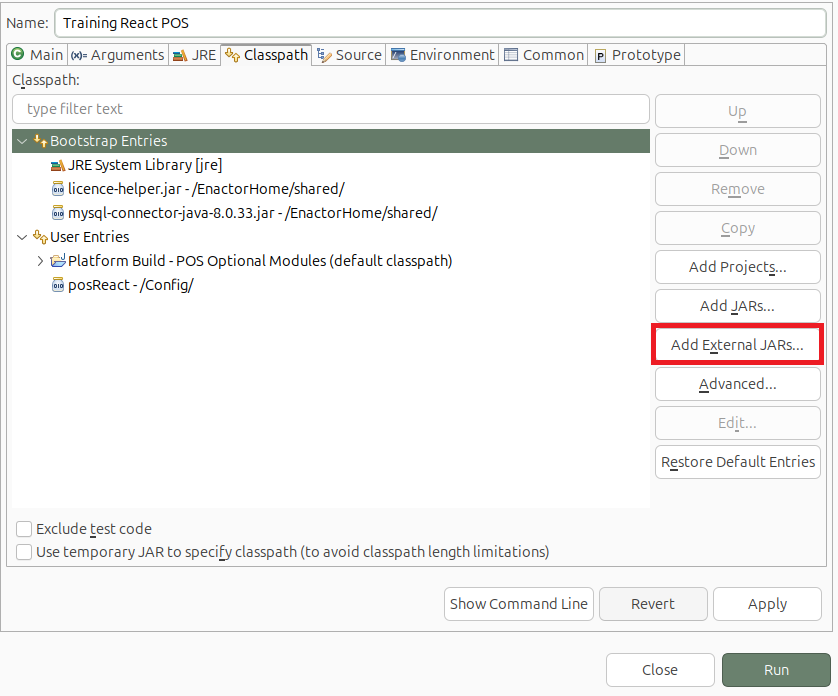
See How to Create a POS Extension to generate an Extension Jar.
Launch the POS
Launch the POS and Perform a Sale Transaction and Click Total.
The following extended PreTenderingPrompt will appear with the default POS Extension
that was created.
